Proof key for Code Exchange (PKCE) extends Authorization Code Flow to make it more secure. The extra security allows browsers to authenticate with identity providers (assuming the identity provider supports PKCE).
Since PKCE extends Authorization Code Flow, it follows the same steps as Authorization Code Flow.
- You create a “Sign in with XX” link for users
- Users click the link and sign in to the provider
- The provider redirects the users to a
callback_url - You generate an access token from the
codevalue sent to the thecallback_url - You save the token for subsequent requests
There are minor additions in Step 1 and 4:
- In Step 1, you provide two extra parameters —
code_challengeandcode_challenge_method. - In Step 4, you provide one extra parameter —
code_verifier.
Using PKCE
These are the following steps to use PKCE:
- You create a secret between 43 to 128 characters long.
- In Step 1 (when creating the sign-in link):
- You hash and encode this secret and send it to the identity provider as
code_challenge. - You send a
code_challenge_methodto tell the identity provider what hashing method you used, so they can decode it later.
- You hash and encode this secret and send it to the identity provider as
- In Step 4 (when getting the access token):
- You send the secret as
code_verifier. - The identity provider decodes
code_challengeand compares in with yourcode_verifier. If the decodedcode_challengevalue matchescode_verifier, PKCE will be successful.
- You send the secret as
Creating the Code Challenge
First you need to choose between two code challenge methods.
plain— the code challenge is not hashed.S256— the code challenge is hashed with the SHA-256 hashing algorithm.
The code challenge method must be S256 in most cases. It can only be plain if the server is unable to support S256.
Plain Method
code_verifier and code_challenge will be the same values if the code_challenge_method is set to plain.
Example:
- Code Verifier:
challenge - Code Challenge:
challenge - Code Challenge Method:
plain
S256 Method
The code_challenge must be encrypted with the SHA-256 hashing algorithm and converted into a Base64-url-encoded string if the code_challenge_method is set to S256.
You can create the code challenge with the following functions in browsers and in Node:
// Browsersasync function getCodeChallengeInBrowser(verifier) {  // Hash the code verifier with SHA-256  const encoder = new TextEncoder()  const data = encoder.encode(verifier)  const hashed = await window.crypto.subtle.digest('SHA-256', data)
  // Base64url encode the hash  return window    .btoa(String.fromCharCode.apply(null, new Uint8Array(hashed)))    .replace(/\+/g, '-')    .replace(/\//g, '_')    .replace(/=+$/, '')}
// Nodeimport crypto from 'crypto'function getCodeChallengeInNode(verifier) { // Hash to code verifier with SHA-256 const hash = crypto.createHash('sha256').update(verifier).digest()
// Base64url encode the hash return hash .toString('base64') .replace(/\+/g, '-') .replace(/\//g, '_') .replace(/=/g, '')}Creating a strong PKCE code_verifier
To make your requests more secure, you should generate a cryptographically strong code_verifier each time you trigger a PKCE flow.
You can generate a strong code_verifier with the following code:
// Browsersfunction randomString() { return crypto.getRandomValues(new Uint32Array(5)).join('')}// Nodeimport crypto from 'crypto'function randomString() { return crypto.randomBytes(32).toString('base64')}A PKCE library
I put everything you need about PKCE into a function that’s easy to use. You can find this function in my JavaScript utilities library.
You can install the library like this:
npm install @zellwk/javascriptYou can use the library like this:
import PKCE from '@zellwk/javascript/pkce'
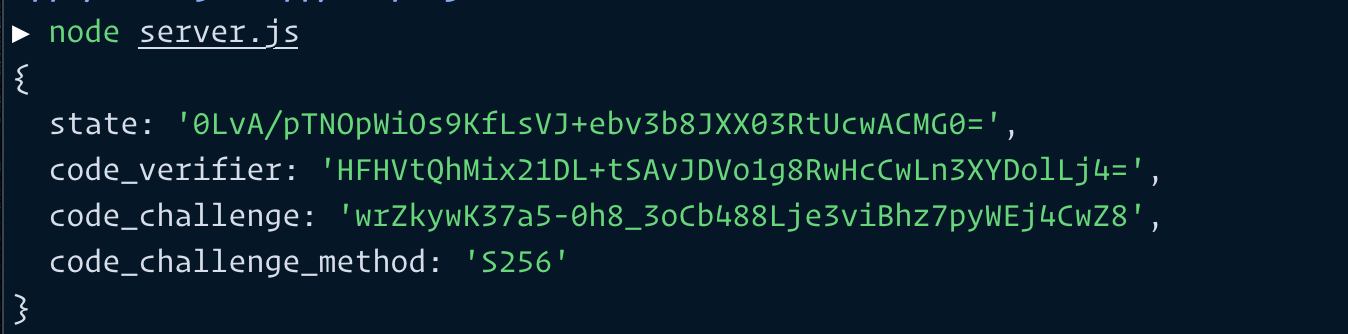
const pkce = await PKCE()console.log(pkce)
Note: You can use this library in browsers without using bundlers like Rollup and Webpack. Here’s how.
Here’s some pictures to show what await PCKE() returns in browsers and node.

That’s it for this lesson.
I’ll talk about the what state is used for in a later lesson.
Welcome! Unfortunately, you don’t have access to this lesson. To get access, please purchase the course or enroll in Magical Dev School.
Unlock this lesson