To render lore and abilities, we need to fetch three more pieces of data from the Dota API. For code simplicity, we can put all these three requests into a single Promise.all call.
export default Tiny({ async afterMount() { const dotaApi = 'https://api.opendota.com/api' const responses = await Promise.all([ zlFetch(`${dotaApi}/constants/hero_lore`), zlFetch(`${dotaApi}/constants/abilities`), zlFetch(`${dotaApi}/constants/hero_abilities`), ]) },})When the data is fetched, we put this data into the state. We can use the data once they’re in state.
export default Tiny({ async afterMount() { // ... this.setState({ lores: responses[0].body, dotaAbilities: responses[1].body, heroAbilities: responses[2].body, }) },})Rending the hero’s description
To render the hero description, we need to pass the npcName into the lores.
export default Tiny({ heroHTML() { // ... return `<div class="single-column flow-2"> <div class="clear site-title"> <h1 data-hero-name>${hero.name}</h1> <img class="hero__img" data-hero-image src="${hero.image}" /> <p data-hero-description>${this.state.lores[npcName]}</p> </div>` },})This doesn’t work immediately. You’ll get an error like this:
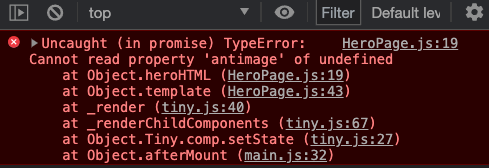
This error happens because lores is not defined yet. We cannot get the npcHeroName from an undefined object.
So the best way is to check whether state.lores is defined before rendering it. We can do this with a getHeroDescription function.
export default Tiny({ // ... getHeroDescription (npcName) { if (!this.state.lores) return '' return this.state.lores[npcName] } // ...}Using it:
export default Tiny({ heroHTML() { // ... return `<div class="single-column flow-2"> <div class="clear site-title"> <h1 data-hero-name>${hero.name}</h1> <img class="hero__img" data-hero-image src="${hero.image}" /> <p data-hero-description>${this.getHeroDescription(npcName)}</p> </div>` },})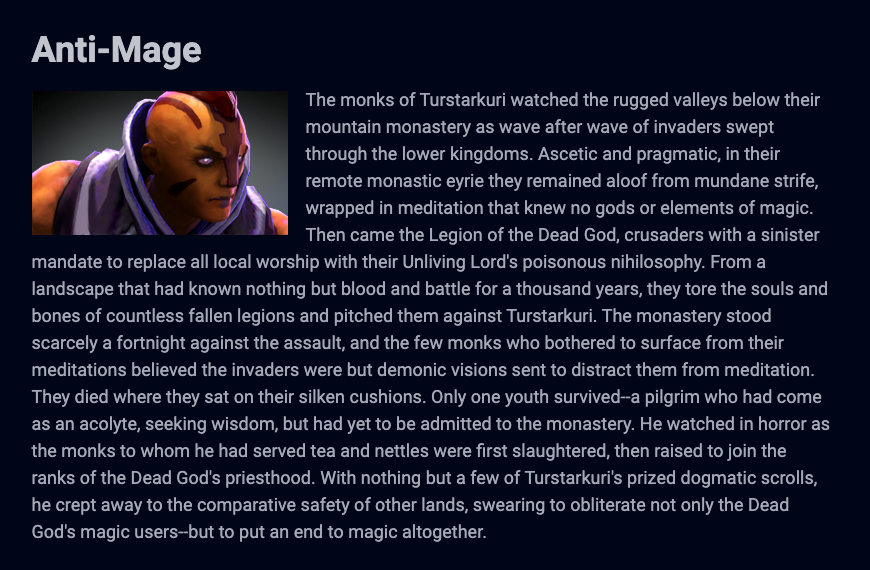
Rendering the hero’s abilities
Let’s create a function called getHeroAbilities to retrieve the hero’s abilities.
export default function Tiny ({  // ...  getHeroAbilities () {
  },  // ...})
Here’s the code we wrote in the Asynchronous JavaScript Module. `
Promise.all([  zlFetch(`${dotaApi}/constants/abilities`),  zlFetch(`${dotaApi}/constants/hero_abilities`),]).then(responses => {  const allAbilities = responses[0].body  const heroAbilities = responses[1].body
  const axeAbilities = heroAbilities[`npc_dota_hero_${heroName}`].abilities    .filter(ability => ability !== 'generic_hidden')    .map(ability => allAbilities[ability])    .map(ability => {      return {        name: ability.dname,        description: ability.desc,        image: `https://api.opendota.com${ability.img}`,      }    })    .map(ability => {      return `<li class="ability">          <p class="ability__title">${ability.name}</p>          <img class="ability__img" src="${ability.image}" alt="${ability.name}">          <p class="desc">${ability.description}</p>        </li>`    })    .join('')
  heroAbilitiesEl.innerHTML = axeAbilities  heroAbilitiesEl.closest('section').removeAttribute('hidden')})
This code is broken down into three parts.
- For getting information about abilities from Dota API
- For creating an array of the hero’s abilities
- For creating the HTML for the hero’s abilities
We can reuse most of this code. In this case, we already have ability data stored inside state.
allAbilitiesis stored instate.dotaAbilities(I changed the variable name because I feltdotaAbilitiesexplained what it holds better thanallAbilities)heroAbilitiesis stored instate.heroAbilities.
We only need the second part in getHeroAbilities. So we can copy-paste that part in.
Make sure to change the following variables so we use the code we have now:
heroNametonpcNameallAbilitiestoheroAbilities
export default function Tiny ({  getHeroAbilities (npcName) {    const { dotaAbilities, heroAbilities } = this.state    if (!dotaAbilities && !heroAbilities) return []
    return heroAbilities[`npc_dota_hero_${npcName}`]      .abilities      .filter(ability => ability !== 'generic_hidden')      .map(ability => dotaAbilities[ability])      .map(ability => {        return {          name: ability.dname,          description: ability.desc,          image: `https://api.opendota.com${ability.img}`        }      })  },})
We can now create the HTML for the hero’s abilities:
export default function Tiny ({  // ...  heroHTML () {    // ...
    return `<div class="single-column flow-2">      <!-- Hero name, image, lore -->
      <section hidden>        <h2>Abilities</h2>        <ul class="abilities flow" data-hero-abilities>          ${this.getHeroAbilities(npcName).map(ability => {            return `<li class="ability">              <p class="ability__title">${ability.name}</p>              <img class="ability__img" src="${ability.image}" alt="${ability.name}">              <p class="desc">${ability.description}</p>            </li>`          }).join('')}        </ul>      </section>    </div>`  }  // ...})
To display the abilities, we need to remove the hidden attribute.
export default function Tiny ({  // ...  heroHTML () {    // ...
    return `<div class="single-column flow-2">      <!-- Hero name, image, lore -->
      <section>        <!-- ... -->      </section>    </div>`  }  // ...})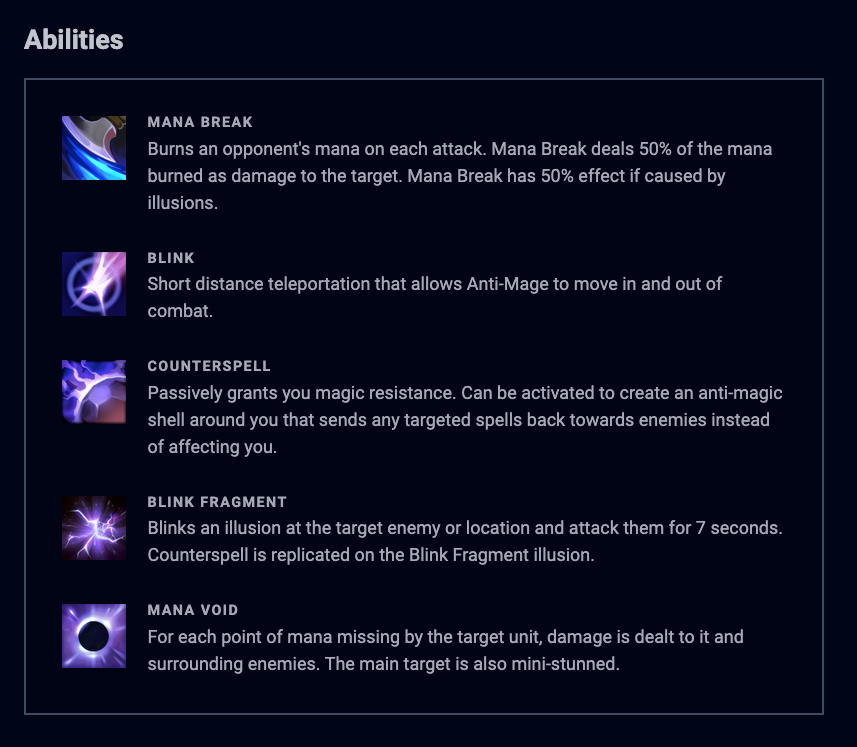
Hiding the abilities section until it is needed
Why did we have the hidden attribute on the <section> element? If you recall, we wanted to hide the abilities section until we get information from the Dota API. It’s weird when you see the abilities section without any abilities. That’s why we hid it.
To prevent the abilities section from showing prematurely, we can check whether any abilities are returned from getHeroAbilities. If no abilities are returned, we can keep this section hidden.
export default function Tiny ({  // ...  heroHTML () {    // ...    const abilities = this.getHeroAbilities(npcName)
    return `<div class="single-column flow-2">      <!-- Hero name, image, lore -->

<section ${abilities.length > 0 ? '' : 'hidden'}> <h2>Abilities</h2> <ul class="abilities flow" data-hero-abilities> ${abilities.map(ability => { // ... }).join('')} </ul> </section> </div>` }, // ...})Welcome! Unfortunately, you don’t have access to this lesson. To get access, please purchase the course or enroll in Magical Dev School.
Unlock this lesson