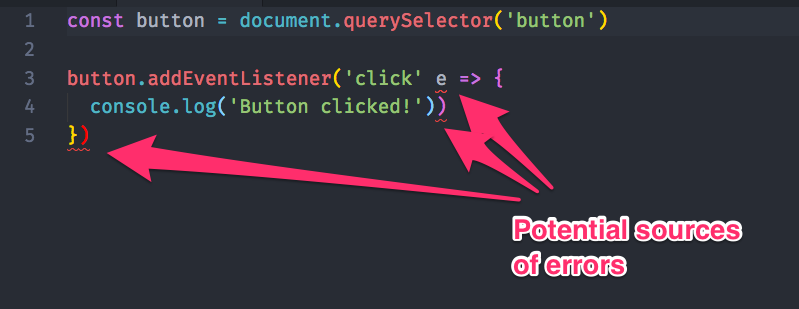
You may notice red squiggly lines all around your code when you use a linter. These red squiggly lines point to potential errors that you should take note of.
Linters show potential errors
If you copy/pasted the exercise in the previous lesson into an editor that has a linter set up, you’ll see lines like these:
Here’s how to use a linter properly
But, if you’re not used to using a linter yet, you can get overwhelmed easily. That’s because linters can give you red squiggly lines that you don’t need to care about.
Watch this video. I’ll explain how to use a linter properly in 4 minutes :)
Removing squiggly lines for global variables
Later on, you may use libraries that add variables to your code. Standard will not recognize these libraries; it’ll add red squiggly lines to your code even if the variables are present.
Here’s an example:
You need to tell Standard that these variables are present if you want to remove the red squiggly lines. To do so, you write /* globals */ at the top of your JavaScript file, like this:
/* globals TimelineMax Back */Exercise
Get yourself a bit more comfortable with seeing red squiggly lines :)
Welcome! Unfortunately, you don’t have access to this lesson. To get access, please purchase the course or enroll in Magical Dev School.
Unlock this lesson