It’s pretty easy to pass values from sibling components. We can do it in two steps:
- Emit an event to the parent component
- Pass the value as props down into the sibling component
For example, if we want to increase the child count value in Total Count component, we can emit the child count into the parent component. In this case, let’s emit the child count via a child-count event.
export default Tiny({ // ... increaseCount(event) { this.setState({ count: this.state.count + 1, }) this.emit('child-count', { count: this.state.count, }) }, // ...})The parent component can then receive this child-count, change the value saved in state, and pass the value down into Total Count.
Tiny({  // ...  setChildCount(event) {    this.setState({      childCount: event.detail.count,    })  },
  template() {    return `      <div        class="component parent-component flow"        tiny-listener="[increase-parent-count, increaseSelfCount] [child-count, setChildCount]"      >        <h1>Parent Counter</h1>        <!-- ... -->        <div class="half">          <!-- ... -->          <div tiny-component="totalCount" tiny-props="[parentCount, state.count] [childCount, state.childCount]"></div>        </div>      </div>    `  },})
Unfortunately, the code above doesn’t work. You should get an error that says Cannot read property 'bind' of undefined at this point.
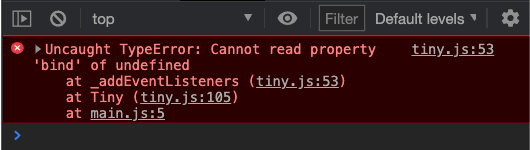
This error happens because we changed the event listener string. We need to adjust Tiny to make it accept both singular and multiple event listeners.
Accepting multiple event listeners
Since we used the same syntax as multiple props, we can copy-paste the code we used to parse the attribute string.
export default function Tiny(options) {  // ...  function _addEventListeners(options) {    const listenerElements = options.element.querySelectorAll('[tiny-listener]')    for (const listenerElement of listenerElements) {      const attribute = listenerElement.getAttribute('tiny-listener')
      const values = attribute        .replace(/\[/g, '')        .replace(/\]/g, '')        .replace(/,/g, '')        .split(/\s+/)      // ...    }  }  // ...}
We will then loop through the values and add event listeners.
export default function Tiny(options) {  // ...  function _addEventListeners(options) {    const listenerElements = options.element.querySelectorAll('[tiny-listener]')    for (const listenerElement of listenerElements) {      // ...      for (let index = 0; index < values.length - 1; index = index + 2) {        const eventName = values[index]        const fn = values[index + 1]
        listenerElement.addEventListener(eventName, options[fn].bind(options))      }    }  }  // ...}
The child count should now be successfully emitted into the parent component, then successfully passed into Total Count via props.
Making things more robust
The tiny-listener string is extremely long. When it’s this long, we may want to break the event listeners into multiple lines.
Tiny({ // ... template() { return ` <div class="component parent-component flow" tiny-listener=" [increase-parent-count, increaseSelfCount] [child-count, setChildCount] " > <!-- ... --> </div> ` },})This breaks the implementation we have because we’ll get extra whitespaces in front and behind the array.
export default function Tiny(options) {  // ...  function _addEventListeners(options) {    const listenerElements = options.element.querySelectorAll('[tiny-listener]')    for (const listenerElement of listenerElements) {      const attribute = listenerElement.getAttribute('tiny-listener')
      const values = attribute        .replace(/\[/g, '')        .replace(/\]/g, '')        .replace(/,/g, '')        .split(/\s+/)
      console.log(values)      // ...    }  }  // ...}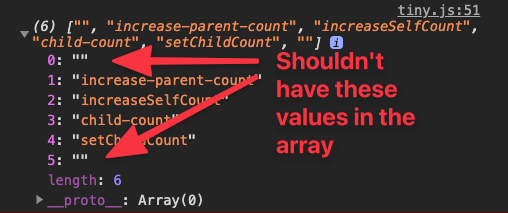
We can prevent these whitespaces by trimming the string before running regular expressions.
export default function Tiny(options) {  // ...  function _addEventListeners(options) {    const listenerElements = options.element.querySelectorAll('[tiny-listener]')    for (const listenerElement of listenerElements) {      const attribute = listenerElement.getAttribute('tiny-listener')
      const values = attribute        .trim()        .replace(/\[/g, '')        .replace(/\]/g, '')        .replace(/,/g, '')        .split(/\s+/)      // ...    }  }  // ...}
We should also do the same steps while parsing the attribute string for props. But since both tiny-listener and tiny-props use the same parser, we can create a function dedicated to parsing attribute strings.
export default function Tiny(options) { // ... function _parseAttributeStrings(string) { return string .trim() .replace(/\[/g, '') .replace(/\]/g, '') .replace(/,/g, '') .split(/\s+/) } // ...}We can use _parseAttributeStrings like this:
export default function Tiny(options) { // ... function _addEventListeners(options) { // ... for (const listenerElement of listenerElements) { const attribute = listenerElement.getAttribute('tiny-listener') const values = _parseAttributeStrings(attribute) // ... } } // ... function _addProps(comp) { // ... const props = _parseAttributeStrings(attribute) // ... } // ...}Improving the Regex
We can refactor the three replace methods into one by adding an OR check in the regular expression. Characters that are checked with OR are wrapped within square brackets.
So the regular expression can become like this:
export default function Tiny(options) { // ... function _parseAttributeStrings(string) { return string .trim() .replace(/[[\],]/g, '') .split(/\s+/) }}Even though this regular expression looks complicated, you already know what it does.
Welcome! Unfortunately, you don’t have access to this lesson. To get access, please purchase the course or enroll in Magical Dev School.
Unlock this lesson