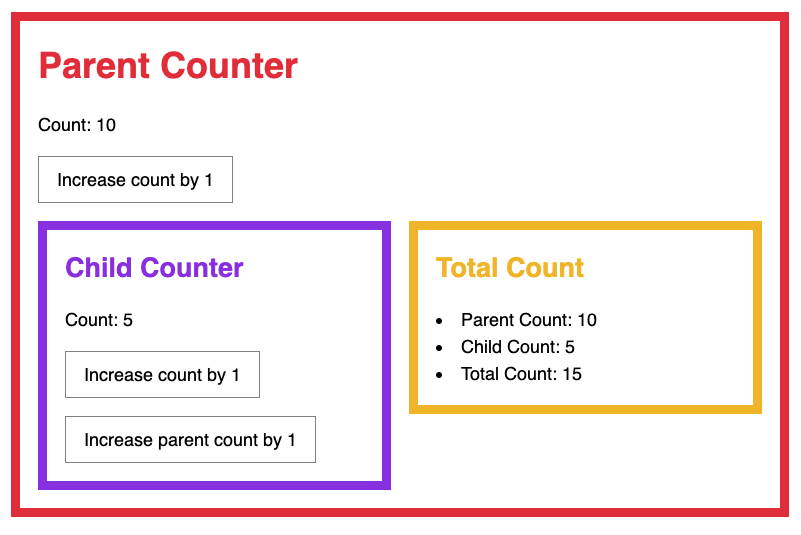
Right now, we initialized childCount in the parent component to 10 while count in the child component is set to 5. These two values don’t match.
We don’t want to have information in two places. We want to let the child control the initial childCount value inside the parent component.
But how?
We’ll do this with a mounting step.
Before we continue, let’s remove the initial childCount value we added to the component.
Tiny({ state: { // ... // Remove this childCount: 10, }, // ...})Mounting
Mounting is the process to render the component for the first time. This process includes everything necessary for the initial load — even if data needs to be loaded asynchronously.
To make mounting work, we need to give users a callback to run after the initial mount. They can then use setState inside afterMount to trigger a re-render.
Here’s the code we can use in Child to set the parent’s childCount value.
export default Tiny({  state: {    count: 5,  },
  afterMount() {    this.emit('child-count', {      count: this.state.count,    })  },  // ...})
Enabling afterMount
First, not all components will have an afterMount method. We can initialize afterMount as an empty function to make these components work.
const initial = {  // ...  afterMount() {},}
export default function Tiny(options) {  options = Object.assign({}, initial, options)  // ...}
Since mounting only happens once — during the initial load — we want to make sure we don’t run afterMount again. We can do this by checking with a Boolean called mounted. We’ll set mounted to false initially.
const initial = { props: {}, mounted: false, afterMount() {},}We will then change mounted to true once the component is mounted.
export default function Tiny(options) { // ... if (options.selector) { _render(options) _addEventListeners(options) _renderChildComponents(options) options.mounted = true options.afterMount() } // ...}Children components also get mounted once, so we need to make sure we run afterMount only once.
export default function Tiny(options) {  // ...  function _renderChildComponents(options) {    // ...
    for (const compEl of compEls) {      // ...
      comp.element = compEl      _addProps(comp)      _render(comp)      _addEventListeners(comp)
      if (!comp.mounted) {        comp.mounted = true        comp.afterMount()      }    }  }  // ...}
That’s it! The child’s count will now be propagated to the parent, then to the sibling correctly.
Welcome! Unfortunately, you don’t have access to this lesson. To get access, please purchase the course or enroll in Magical Dev School.
Unlock this lesson