Before we can filter heroes, we need to pass the heroes down into Filters as props. We can do this by adding tiny-props to the Filter component.
Tiny({  template() {    return `      <!-- Header -->
      <main>        <div class="wrap">          <!-- Site title -->
          <div class="sidebar-content">            <div class="sidebar flow">              <div tiny-component="Filters" tiny-props="[heroes, state.heroes]"></div>            </div>
            <div class="content">              <!-- Heroes list -->            </div>          </div>      </main>    `  },})
We can now get heroes inside the filter component via the props property.
export default Tiny({ template() { console.log(this.props.heroes) // ... },})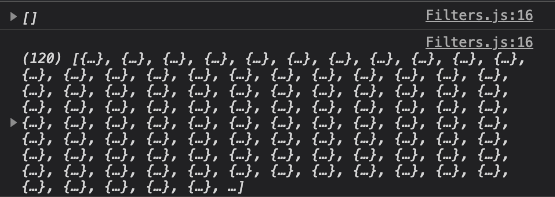
Again, this.props.heroes begins as an empty array because we haven’t fetched heroes from endpoint yet.
Filtering Heroes
To filter heroes, we need to listen to a change in any of the checkboxes. The easiest way to do this is to add an event listener to an ancestor of all the checkboxes.
In this case, I chose to add the event listener to the <section> element with the filter class.
export default Tiny({  template() {    return `      <!-- SVG for checkbox -->
      <section class="filters" tiny-listener="[change, filterHeroes]">        <!-- ... -->      </section>    `  },})
In the code above, I listened for the change event. When the change event fires, we call the filterHeroes function. So let’s go ahead and add filterHeroes function.
export default Tiny({ filterHeroes(event) {}, // ...})We want to filter heroes by the three categories in filterHeroes. We can use the code we wrote in the previous version of Dota Heroes, which is this:
function filterHeroesByCategories(heroes) {  const selectedAttackTypes = [    ...document.querySelectorAll('attack-type input:checked'),  ].map(checkbox => checkbox.id)  const selectedPrimaryAttributes = [    ...document.querySelectorAll('primary-attribute input:checked'),  ].map(checkbox => checkbox.id)  const selectedRoles = [    ...document.querySelectorAll('role input:checked'),  ].map(checkbox => checkbox.id)
  return (    heroes      // Filter by attack type      .filter(hero => {        if (selectedAttackTypes.length === 0) return true        return selectedAttackTypes.includes(hero.attackType)      })      // Filter by primary attribute      .filter(hero => {        if (selectedPrimaryAttributes.length === 0) return true        return selectedPrimaryAttributes.includes(hero.primaryAttribute)      })      // Filter by role      .filter(hero => {        if (selectedRoles.length === 0) return true        return selectedRoles.some(role => {          return hero.roles.includes(role)        })      })  )}
What this code does is:
- Search the DOM for checkboxes of each category
- Filters heroes based on all three categories
- Returns the filtered list of heroes
First we copy the entire chunk into filterHeroes
export default Tiny({ filterHeroes(event) { // Copy everything in here }, // ...})We don’t need to search inside document anymore since we know filters are within the Filter component. We can use this.element which refers to the Filter component.
export default Tiny({ filterHeroes(event) { const selectedAttackTypes = [ ...this.element.querySelectorAll('attack-type input:checked'), ].map(checkbox => checkbox.id) const selectedPrimaryAttributes = [ ...this.element.querySelectorAll('primary-attribute input:checked'), ].map(checkbox => checkbox.id) const selectedRoles = [ ...this.element.querySelectorAll('role input:checked'), ].map(checkbox => checkbox.id) }, // ...})filterHeroes needs a list of heroes which can be found via this.props.heroes
export default Tiny({ filterHeroes(event) { // ... const filteredHeroes = this.props.heroes // Filter by attack type .filter(/* Filter by attack type */) .filter(/* Filter by primary attribute */) .filter(/* Filter by role */) }, // ...})After filtering heroes, the Filter component needs to inform the parent component — so we can update the list of heroes. We do this by emiting the filtered list of heroes upwards.
export default Tiny({ filterHeroes(event) { // ... this.emit('filter-heroes', { filteredHeroes }) }, // ...})The parent component can listen to filter-heroes event to get the list of filtered heroes. Again, we can listen to filter-heroes anywhere above the Filters component. In this case, I chose to listen via main because it’s more visible for me.
Tiny({  // ...  template() {    return `      <!-- Header -->      <main tiny-listener="[filter-heroes, filterHeroes]">        <div class="wrap">          <!-- Site Title -->
          <div class="sidebar-content">            <div class="sidebar flow">              <div tiny-component="Filters" tiny-props="[heroes, state.heroes]"></div>            </div>
            <div class="content">              <!-- Heroes List -->            </div>          </div>      </main>    `  },})
When the filter-heroes event fires, we run a filterHeroes method. So let’s go ahead and create this filterHeroes method.
We can also check whether heroes are actually filtered with a console.log statement.
Tiny({ // ... filterHeroes(event) { console.log(event.detail.filteredHeroes) }, // ...})Here, we see the filters are working correctly for attack-type and roles, but it doesn’t work correctly for primary-attribute. (The number of heroes returned from our current algorithm should not be zero).
Fixing Primary Attribute Filter
There are two possible areas where the problem could have happened:
- Did we detect selected primary attributes correctly?
- Was there anything wrong with the filter algorithm?
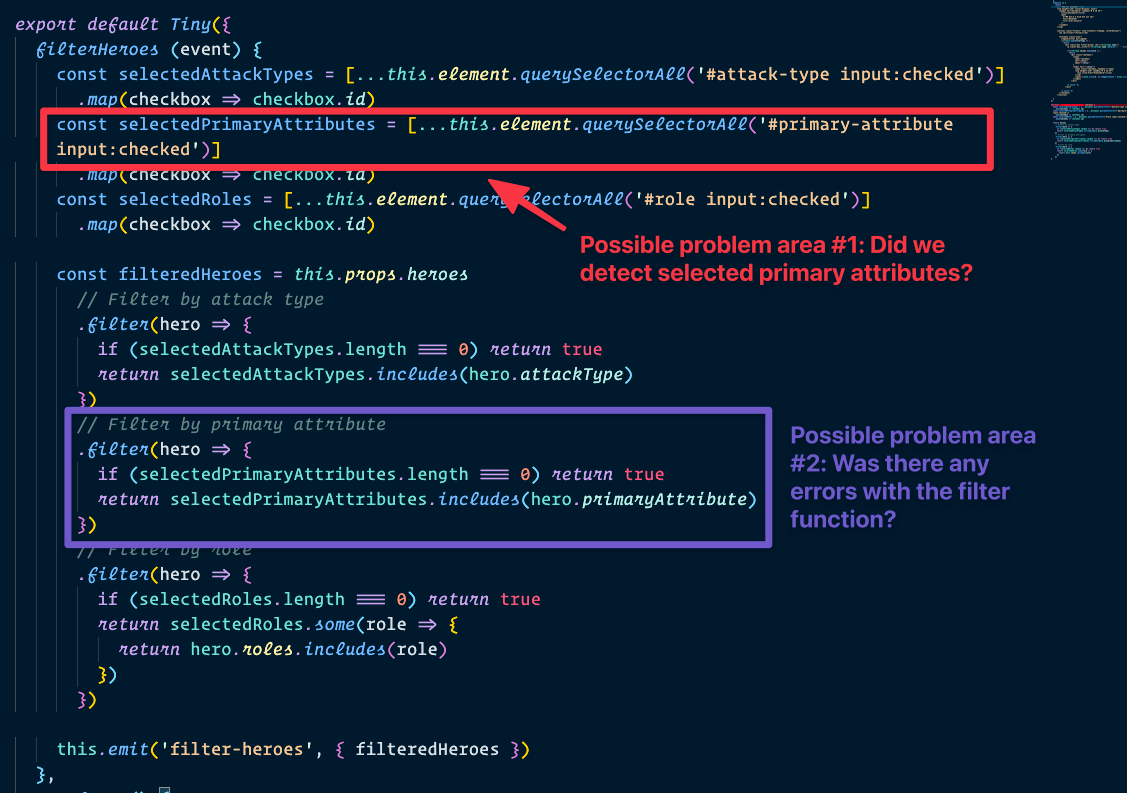
Let’s do a quick debug to check what’s wrong.
Debugging problem area 1
We will log selectedPrimaryAttribute to detect whether there are any problems in the first problem area.
export default Tiny({  filterHeroes(event) {    const selectedAttackTypes = [      ...this.element.querySelectorAll('attack-type input:checked'),    ].map(checkbox => checkbox.id)    const selectedPrimaryAttributes = [      ...this.element.querySelectorAll('primary-attribute input:checked'),    ].map(checkbox => checkbox.id)    const selectedRoles = [      ...this.element.querySelectorAll('role input:checked'),    ].map(checkbox => checkbox.id)
    console.log(selectedPrimaryAttributes)
// ... }, // ...})We can see all three options — strength, agility, and intelligence — getting checked here, so the problem doesn’t occur at area 1.
Debugging problem area 2
The filter algorithm suggests we’re checking whether selectedPrimaryAttributes includes a value from hero.primaryAttribute.
We can check the hero.primaryAttribute value to ensure it matches the values inside selectedPrimaryAttribute.
export default Tiny({ filterHeroes(event) { // ... const filteredHeroes = this.props.heroes .filter(/* ... */) .filter(hero => { if (selectedPrimaryAttributes.length === 0) return true console.log(hero.primaryAttribute) return selectedPrimaryAttributes.includes(hero.primaryAttribute) }) .filter(/* ... */) // ... },})We can clearly see that hero.primaryAttribute shows the abbreviated value:
strinstead ofstrengthagiinstead ofagilityintinstead ofintelligence
Knowing this, how can we fix the filters?
Fixing the primary attribute filter
There are multiple ways to fix the filter once we know where the problem lies. One way is to create the HTML with the abbreviated version.
We can do this by creating a function called abbreviate.
Since we only want to abbreviate strength, agility, and intelligence, we can return everything else as they are
function abbreviate(value) { if (value !== 'strength' && value !== 'agility' && value !== 'intelligence') return value}If the value is strength, agility, or intelligence, we can return the first three characters as the value.
function abbreviate(value) { if (value !== 'strength' && value !== 'agility' && value !== 'intelligence') return value return value.slice(0, 3)}We can use abbreviate like this:
export default Tiny({  // ...  template() {    return `      <!-- SVG for checkbox -->      <section class="filters" tiny-listener="[change, filterHeroes]">        <!-- ... -->
        <fieldset class="flow">          <!-- ... -->          ${filters            .map(filterType => {              return `              <div class="box filter-group" id="${filterType.name}">                <p class="box__title">${filterType.name.replace('-', ' ')}</p>
                ${filterType.values                  .map(value => {                    // Runs through an `abbreviate` function for the `id`, `name` and `for` values                    return `                    <div class="checkbox">                      <input                        type="checkbox"                        id="${abbreviate(value)}"                        name="${abbreviate(value)}"                      >                      <label for="${abbreviate(value)}">                        <span class="checkbox__fakebox"></span>                        <svg height="1em" viewBox="0 0 20 15">                          <use xlink:href="checkmark"></use>                        </svg>                        <span>${                          value.slice(0, 1).toUpperCase() + value.slice(1)                        }</span>                      </label>                    </div>                  `                  })                  .join('')}              </div>            `            })            .join('')}        </fieldset>      </section>    `  },})
This fixes the strength, agility, and intelligence filter.
Welcome! Unfortunately, you don’t have access to this lesson. To get access, please purchase the course or enroll in Magical Dev School.
Unlock this lesson