We want to display the filtered heroes next. The most straightforward way here is to replace state.heroes with the new values. But this is not ideal.
// NOT IDEAL. DO NOT USE.Tiny({ // ... filterHeroes(event) { this.setState({ heroes: event.detail.filteredHeroes }) }, // ...})Why?
If we replace state.heroes, we won’t be able to pass the full list of heroes down into Filter.js, which creates problems when we filter in the future.
The better way to go about this is to create a new state variable. Let’s call it displayedHeroes. We’ll initialize it to an empty array like state.heroes.
// BETTER WAY. DO THIS.Tiny({ // ... state: { displayedHeroes: [], heroes: [], }, // ...})We want to display all heroes when we first obtain data from the Dota API. We can display all heroes by setting both state.displayedHeroes and state.heroes to the same value.
Tiny({ // ... async afterMount() { // ... this.setState({ heroes, displayedHeroes: heroes, }) }, // ...})We can now display heroes with state.displayedHeroes
Tiny({  // ...  template() {    return `      <!-- Header -->
      <main tiny-listener="[filter-heroes, filterHeroes]">        <div class="wrap">          <!-- Site title -->
          <div class="sidebar-content">            <div class="sidebar flow">              <div tiny-component="Filters" tiny-props="[heroes, state.heroes]"></div>            </div>
            <div class="content">              <ul class="heroes-list">                ${this.state.displayedHeroes                  .map(hero => {                    // ...                  })                  .join('')}              </ul>            </div>          </div>      </main>    `  },})
When we filter, we can change state.displayedHeroes to update the list of displayed heroes.
filterHeroes (event) { this.setState({ displayedHeroes: event.detail.filteredHeroes }) },You notice the list of heroes get updated, but the checkbox remains unchecked. Why?
This happens because our naïve implementation of Tiny doesn’t do DOM diffing, so it re-renders the entire DOM. When it re-renders the entire DOM, it doesn’t have any information about the state of each checkbox. (This is why DOM Diffing is important. This is also why Tiny is not ready for production).
But let’s not whine about our naïve implementation, let’s make the checkboxes work for now.
Allowing checkbox state to persist across renders
Before we update the DOM, we need to save the state of each checkbox inside the state object.
The simplest way to do this is create an initial state object that contains all the possible checkbox options. We can create this initial state manually, but what’s the point… right?
We can use JavaScript to get a list of possible values from filters. The shortest way is through reduce.
export default Tiny({ // ... afterMount() { const values = filters.reduce((acc, current) => { return [...acc, ...current.values] }, []) console.log(values) }, // ...})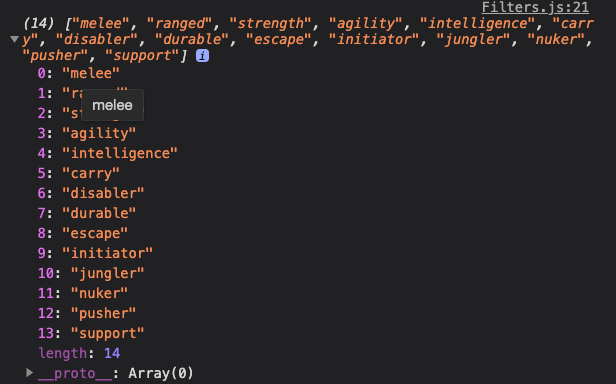
We can then loop through each value and consolidate the initial state inside a newState object. This lets us update the state once (and hence re-render the component once).
export default Tiny({  afterMount() {    // ...    const newState = {}
    values.forEach(value => {      newState[value] = false    })
    this.setState(newState)    console.log(this.state)  },})
Note: If you’re not comfortable with reduce, you can choose to run 2 forEach loops like what we did inside the template function. Both versions work — neither is better.
We’ll get an initial state like this:
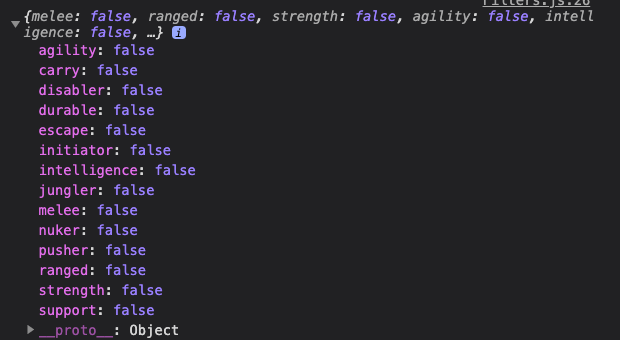
When the user checks a checkbox, we need to update the state. Here, we need to know the checkbox’s id (since the id matches the value we stored in the state object). We also need to know whether the checkbox is checked.
Before we can make this work, we need to abbreviate the value when we store it into the state. (We need this for str, agi, and int)
export default Tiny({ // ... afterMount() { // ... values.forEach(value => { newState[abbreviate(value)] = false }) // ... }, // ...})If the checkbox is checked, we uncheck it. If the checkbox is unchecked, we check it.
export default Tiny({  template() {    console.log(this.state)
    return `      <!-- SVG for checkbox -->      <section class="filters" tiny-listener="[change, filterHeroes]">        <!-- ... -->
        <fieldset class="flow">          <legend>Filter by</legend>          ${filters            .map(filterType => {              return `              <div class="box filter-group" id="${filterType.name}">                <!-- ... -->
${filterType.values .map(value => { return ` <div class="checkbox"> <input // ... ${this.state[abbreviate(value)] ? 'checked ' : ''} > <!-- ... --> </div> ` }) .join('')} </div> ` }) .join('')} </fieldset> </section> ` },})A Tiny Refactor
Saving the checkbox state shouldn’t be in filterHeroes since they’re not the same thing. I propose we call a new function — saveFilterState — when the change event fires.
export default Tiny({  // ...  saveFilterState(event) {    const checkbox = event.target    this.state[checkbox.id] = checkbox.checked  },
  template() {    return `      <!-- SVG for checkbox -->
      <section class="filters" tiny-listener="[change, saveFilterState]">        <!-- ... -->      </section>    `  },})
We can run filterHeroes inside saveFilterState to make things very explicit.
export default Tiny({  // ...  saveFilterState (event) {    const checkbox = event.target    this.state[checkbox.id] = checkbox.checked
    const filteredHeroes = this.fliterHeroes()    this.emit('filter-heroes', { filteredHeroes })  },  // ...}
Even better, we can emit filter-heroes from saveFilterState. This allows filterHeroes to only do one thing — filter heroes. Everything else happens when we save the filtered state.
export default Tiny({  // ...  saveFilterState (event) {    const checkbox = event.target    this.state[checkbox.id] = checkbox.checked
    const filteredHeroes = this.fliterHeroes()    this.emit('filter-heroes', { filteredHeroes })  },
filterHeroes() { // ... return this.props.heroes .filter(/* ... */) .filter(/* ... */) .filter(/* ... */) }}Welcome! Unfortunately, you don’t have access to this lesson. To get access, please purchase the course or enroll in Magical Dev School.
Unlock this lesson