Pointer Events is a standardised API that lets you support Mouse, Touch events, and all Pointer-like input devices (like pens and stylus) at the same time. There’s no need to use Mouse and Touch events individually anymore.
Pointer Events vs pointer-events
Don’t get confused between the Pointer Events API (JavaScript) and pointer-events CSS property. They’re different things.
I covered pointer-events slightly back in event delegation.
Relationship between Pointer, Mouse, and Touch
Pointer Events contains events from Mouse and Touch events.
| Pointer | Mouse | Touch |
|---|---|---|
pointerdown |
mousedown |
touchstart |
pointerup |
mouseup |
touchend |
pointermove |
mousemove |
touchmove |
pointerenter |
mouseenter |
|
pointerleave |
mouseleave |
|
pointerout |
mouseout |
|
pointerover |
mouseover |
|
pointercancel |
touchcancel |
Pointer Event Properties
PointerEvent inherits the MouseEvent interface. This means Pointer Events contains all event properties from Mouse Events.
It also has the following new properties:
pointerId: ID for the pointer causing the event.pointerType: Whether the pointer is amouse,pen, ortouch.widthandheight: The pointer’s width and height (inpx)pressure&tangentialPressure: Information about the force that’s causing the event.tiltX&tiltY: Whether the pointer is tiltingtwist: Whether pointer is being rotatedisPrimary: Indicates whether the pointer represents the primary pointer (For example, the left mouse button is the primary mouse button).
Capturing and releasing pointers
You can use setPointerCapture to make ONE element the target for all future pointer events. We’ll use this when we build DragDrop.
element.setPointerCapture(pointerId)You can use releasePointerCapture to release the element from future pointer events. We’ll also use this when we build DragDrop.
element.releasePointerCapture(pointerId)Pointer Events Support
Pointer Events is well supported on major browsers.
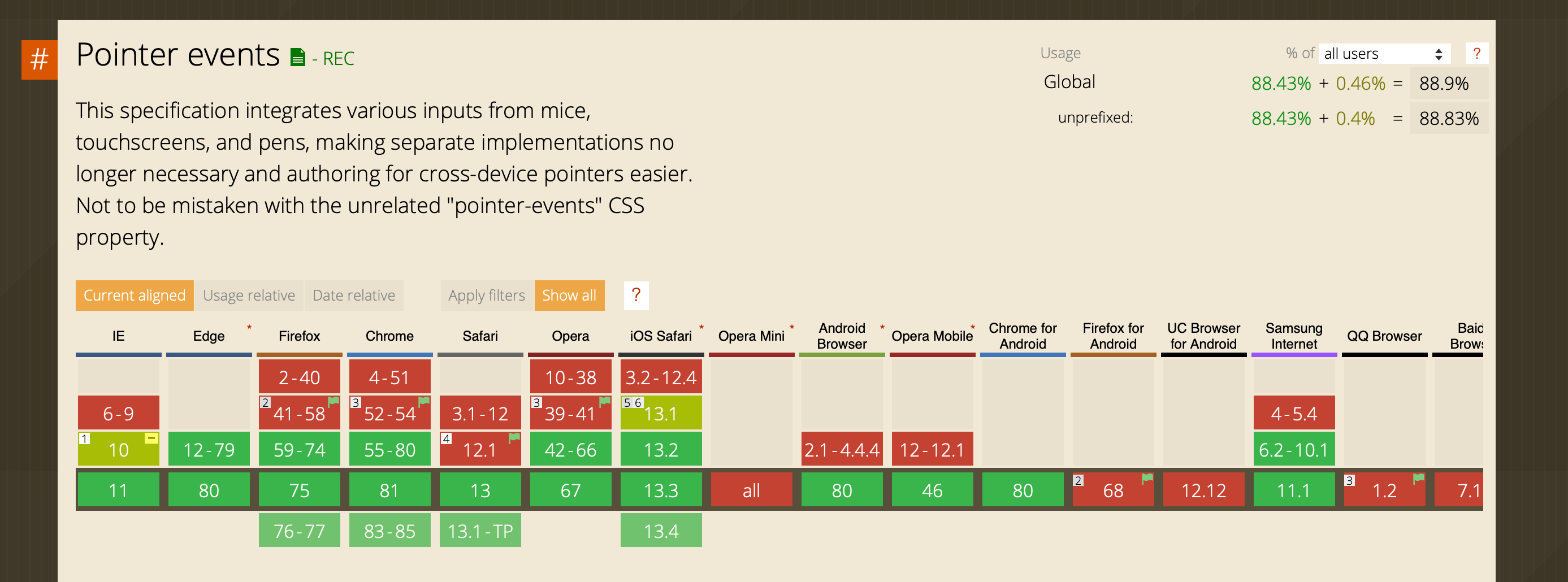
If you need to support Pointer Events on lesser-known browsers, you can use this polyfill.
Welcome! Unfortunately, you don’t have access to this lesson. To get access, please purchase the course or enroll in Magical Dev School.
Unlock this lesson