It can be a pretty fun experience to play with the mouse if things follow you around. Here’s an example of a company page where people look at different directions depending on where your mouse is.
Pretty cool. Right?
We’re going to build something similar. But instead of using real pictures, we’ll spin a Pacman around.
The HTML
We’re going to use an SVG for the Pacman. Here’s what it looks like:
<svg class="pacman"> <use href="images/pacman.svg#pacman"></use></svg>This SVG has already been added for you in the Starter files.
The CSS
We want to rotate the Pacman so it follows the mouse. The simplest way to build this is to consider 8 possible directions:
- North
- North East
- East
- South East
- South
- South West
- West
- North West

Let’s try rotating our Pacman into these directions with real CSS.
Rotating the Pacman
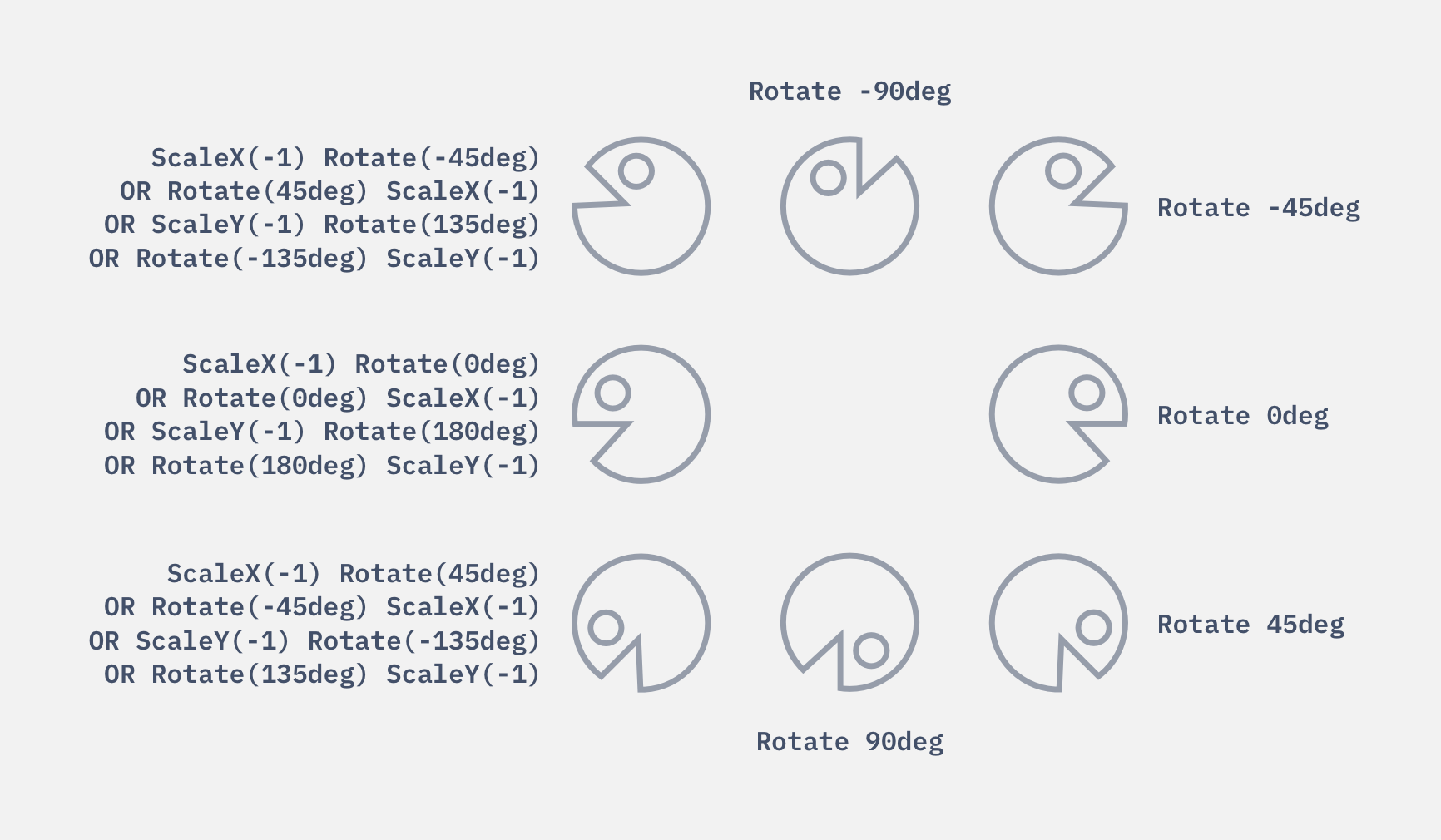
If you open the webpage, the first thing you’ll notice is that the Pacman faces East. We have not applied a transform on it yet. So this rotation is 0deg.

We can rotate the Pacman clockwise 45 degrees to make it face south-east.
.pacman { transform: rotate(45deg);}
We can rotate the Pacman clockwise 90 degrees to make it face south.
.pacman { transform: rotate(90deg);}
We can rotate the Pacman anti-clockwise 45 degrees to make it face north-east.
.pacman { transform: rotate(-45deg);}
We can rotate the Pacman anti-clockwise 90 degrees to make it face north.
.pacman { transform: rotate(-90deg);}
Now we need to get the Pacman to face right for the remaining three directions:
- North West
- West
- South West
These three directions are trickier compared to the previous five.
Flipping and Rotating
We can rotate the Pacman clockwise 135 degrees to make it face south-west, but the Pacman would be upside-down.
.pacman { transform: rotate(135deg);}
One way of making Pacman face the right way is to flip it horizontally (with scaleX) before rotating it clockwise by 45 degrees.
.pacman { transform: scaleX(-1) rotate(45deg);}
Alternatively, we can rotate Pacman anti-clockwise by 45 degrees before we flip it.
.pacman { transform: rotate(-45deg) scaleX(-1);}Yet another method is to flip the Pacman vertically first, then rotate anti-clockwise by 135 degrees.
.pacman { transform: scaleY(-1) rotate(-135deg);}Finally, another method is to rotate Pacman by 135 degrees first before flipping it vertically.
.pacman { transform: rotate(135deg) scaleY(-1);}The method we use depends on the angle we rotate with. We have to get this angle with JavaScript.
Transform Chart
We can derive rotate and scale values required for Pacman to get into all 8 directions using the above methods.
Welcome! Unfortunately, you don’t have access to this lesson. To get access, please purchase the course or enroll in Magical Dev School.
Unlock this lesson