There are two ways to select form fields with JavaScript. The first way is through querySelector. (You already know how to do this.)
The second way is through form.elements. This way is preferred because you don’t need to select your form items manually through querySelector.
Form.elements
All <form> elements have the elements property. It returns an object that contains three types of property-value pairs:
- The
nameof each form field and it’s associated Element. - The
idof each form field and it’s associated Element. - An index of each form field and it’s associated Element.
<form action="" method="post"> <input type="text" name="input1" id="idForInput1" /> <input type="text" name="input2" id="idForInput2" /> <button type="submit"></button></form>const form = document.querySelector('form')
console.log(form.elements)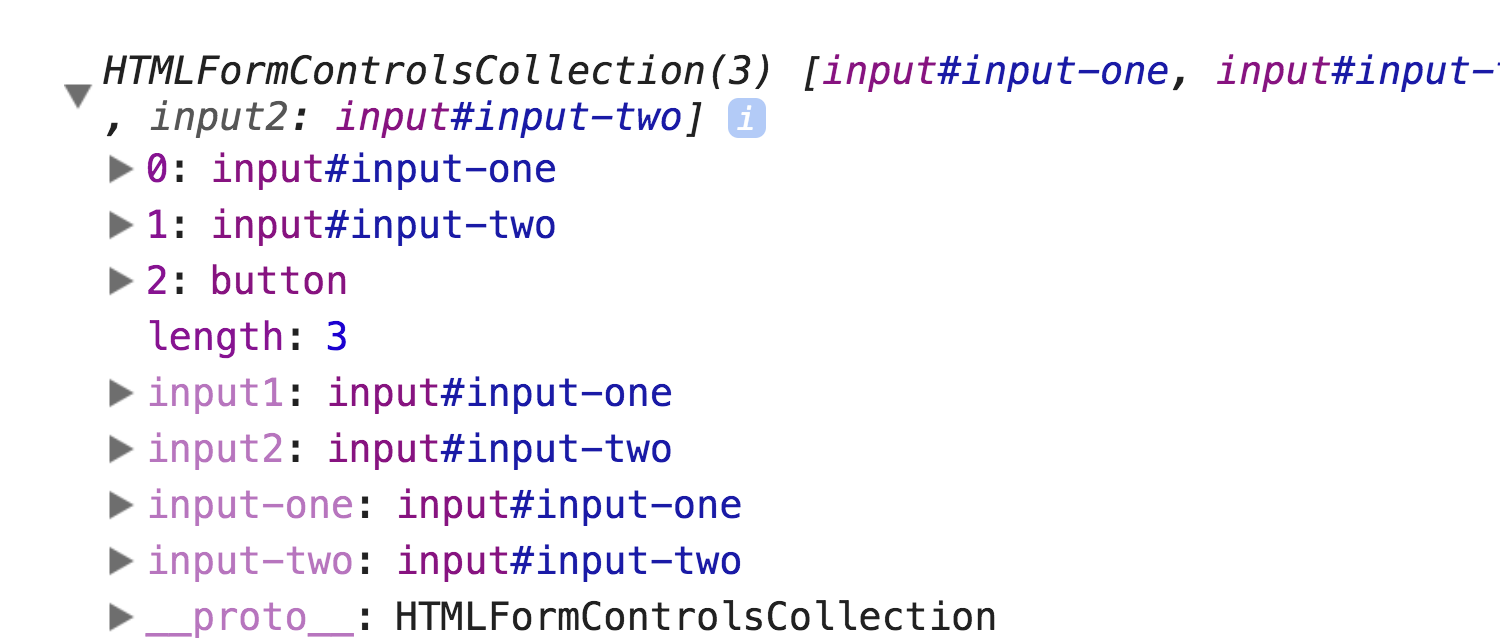
form.elements give you access to all form fields Looping through all fields
You can loop through form.elements to get a list of unique fields.
for (const element of form.elements) { console.log(element)}Selecting a specific field
You can use the name, id, or index to select a specific field.
const usingIndex = form.elements[0]const usingName = form.elements.input1const usingId = form.elements.['input-one'] // You can use dot notation if the id doesn't contain '-'You’ll only need one of these most of the time. I’ll choose id over name over index whenever possible.
Welcome! Unfortunately, you don’t have access to this lesson. To get access, please purchase the course or enroll in Magical Dev School.
Unlock this lesson