You have created a Google Map successfully. The next step is to get and plot directions between two points on the map.
We can do this with Google’s direction API. You can read about Google’s direction API over here.
Getting routes
We can use google.maps.DirectionsService to request directions between two places.
function initGoogleMap() { // ... const directionsService = new google.maps.DirectionsService()}directionsService has a method called route that lets you request for directions. It takes in two arguments: a request object and a callback.
function initGoogleMap() {  // ...  const directionsService = new google.maps.DirectionsService()
  directionsService.route(request, callback)}
request is an object that contains options for Google Map’s Direction API. You can find a list of possible options in Google Map’s Direction API reference.
When you create a request you need to pass in at least three options:
origin: Starting point of the route.destination: Ending point of the route.travelMode: Type of travel mode. Can beDRIVING,TRANSIT,BICYCLING, orWALKING. We will only useDRIVINGfor this Google Maps clone.
Constructing a request
I have created a list of popular attractions in Singapore. You can use these values as the origin and destination of your directions request.
const places = { artScienceMuseum: '6 Bayfront Ave, Singapore 018974', gardensByTheBay: '18 Marina Gardens Dr, Singapore 018953', littleIndia: 'Little India, Singapore', sentosa: 'Sentosa, Singapore', singaporeZoo: '80 Mandai Lake Rd, Singapore 729826',}Here’s an example of the request object.
const request = { origin: places.singaporeZoo, destination: places.sentosa, travelMode: 'DRIVING',}You can use this request to get directions between Singapore Zoo and Sentosa.
directionsService.route(request, callback)The callback contains a result object. If the request is successful, result.status should be OK.
directionsService.route(request, result => { console.log(result.status) console.log(result)})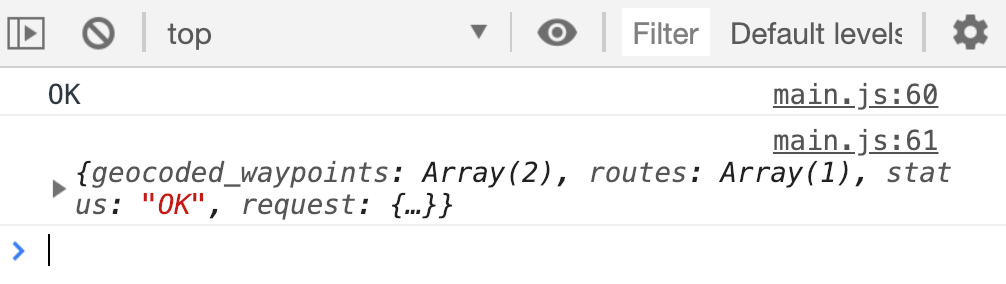
If result.status is OK, we want to show the map.
directionsService.route(request, result => { if (result.status === 'OK') { // Show map } else { console.error(result.status) console.log(result) }})We also have to handle errors if the request is unsuccessful. We’ll get back to this one later.
Showing the route on the map
We can use google.maps.DirectionsRenderer to show the route on the map.
if (result.status === 'OK') { new google.maps.DirectionsRenderer()}directionsRenderer can take in a list of options. You can find the full list here. Two of these options are required. They are:
map: The map to plot to. A value returned fromnew google.maps.Map()directions:resultfromdirectionsService.route
Here’s how you can plot the map:
function initGoogleMap() {  // ...  const map = new google.maps.Map(mapDiv, {    center: { lat: 1.3521, lng: 103.8198 },    zoom: 13,  })
  // ...  directionsService.route(request, result => {    if (result.status === 'OK') {      new google.maps.DirectionsRenderer({        map,        directions: result,      })    } else {      // ...    }  })}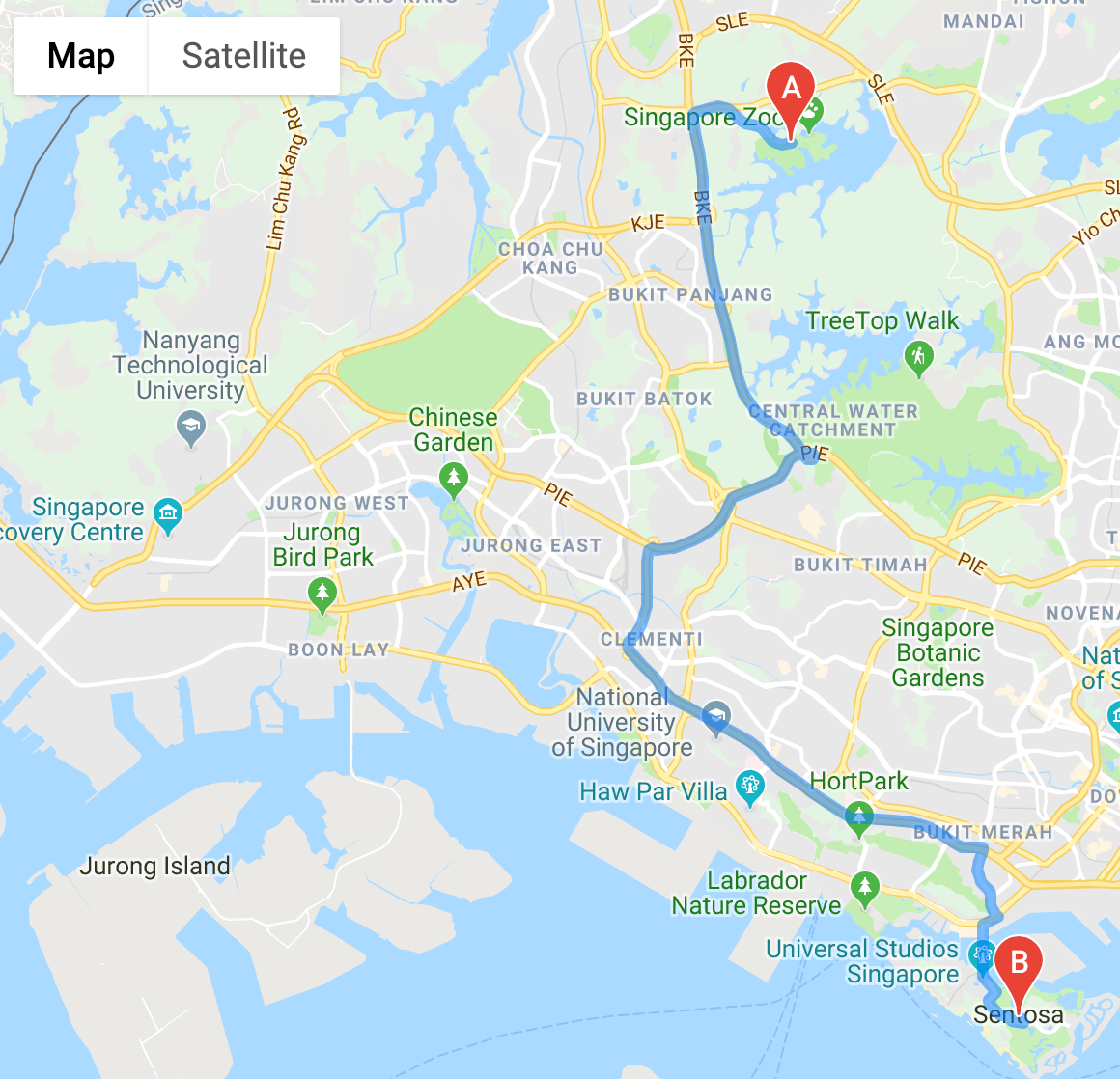
That’s it!
Turning Directions Service into a promise
Notice directionsService takes in a callback? We can turn this callback-style into a promise. First, we’ll create a function to return the promise. Let’s call this getDirections.
function getDirections() { return new Promise(/*...*/)}We need to use Google’s Direction Services API inside getDirections. And the API takes in a request object. We’ll pass this request object into getDirections.
function getDirections(request) { const directionsService = new google.maps.DirectionsService() return new Promise(/*...*/)}A promise has two arguments: resolve and reject.
function getDirections(request) { const directionsService = new google.maps.DirectionsService() return new Promise((resolve, reject) => { // ... })}We make the request inside the promise:
function getDirections(request) { const directionsService = new google.maps.DirectionsService() return new Promise((resolve, reject) => { directionsService.route(request, result => { // ... }) })}If the request is successful, we use resolve to pass ONE argument into the then call. We’ll pass in result in this case.
function getDirections(request) { const directionsService = new google.maps.DirectionsService() return new Promise((resolve, reject) => { directionsService.route(request, result => { if (result.status === 'OK') return resolve(result) }) })}If the request is unsuccessful, we use reject to pass ONE argument into the catch call. Ironically, for the Directions API, the error is also result.
function getDirections(request) {  const directionsService = new google.maps.DirectionsService()
  return new Promise((resolve, reject) => {    directionsService.route(request, result => {      if (result.status === 'OK') return resolve(result)      return reject(result)    })  })}
We can use getDirections like this:
function initGoogleMaps() { // ... getDirections(request) .then(result => { new google.maps.DirectionsRenderer({ map, directions: result, }) }) .catch(console.error)}That’s it!
Welcome! Unfortunately, you don’t have access to this lesson. To get access, please purchase the course or enroll in Magical Dev School.
Unlock this lesson