As mentioned in the previous lesson, an element’s inner display type will generate a corresponding formatting context. This formatting context affects the all child level content within the element. There are 6 different formatting contexts generated by 5 different container boxes.
- Block formatting context
- Inline formatting context
- Table formatting context
- Ruby formatting context
- Flex formatting context
- Grid formatting context
It is important to differentiate between a formatting context and a container box. The formatting context is the environment in which the child elements of the container box exist in, it is not the container box itself. The inline formatting context is the only one which is not generated by a container box.
While block and inline boxes had been around since the earliest days of CSS, the flexible box layout model and the grid layout model were introduced much later. They have features which were introduced to handle the various use-cases that web developers faced over the years but could not be easily solve with the existing box behaviour.
These days, we use the table layout for actual data tables instead of using them to hack together full page web layouts, so we will skip over them for this course. Ruby is specific to East Asian languages and are used to generate the annotations for the base text, so we will skip over them as well.
We will cover both Flexbox and Grid in a dedicated section.
Anonymous boxes
A formatting context will only have boxes of a single type within it. This means for a block formatting context, every box in that context will be a block box. And same goes for an inline formatting context. But this is logic that the browser will resolve on its own.
As developers, we can still have an element with display: block right next to an element with display: inline and they will be rendered without errors. Because browsers will generate anonymous boxes to ensure the logic of formatting contexts holds true all the time. We don’t have control over these boxes, we cannot select them nor style them.
The specification only states the following:
If a block container box has a block-level box inside in, then we force it to have only block-level boxes inside it.
Any text that is directly contained inside a block container element (not inside an inline element) must be treated as an anonymous inline element.
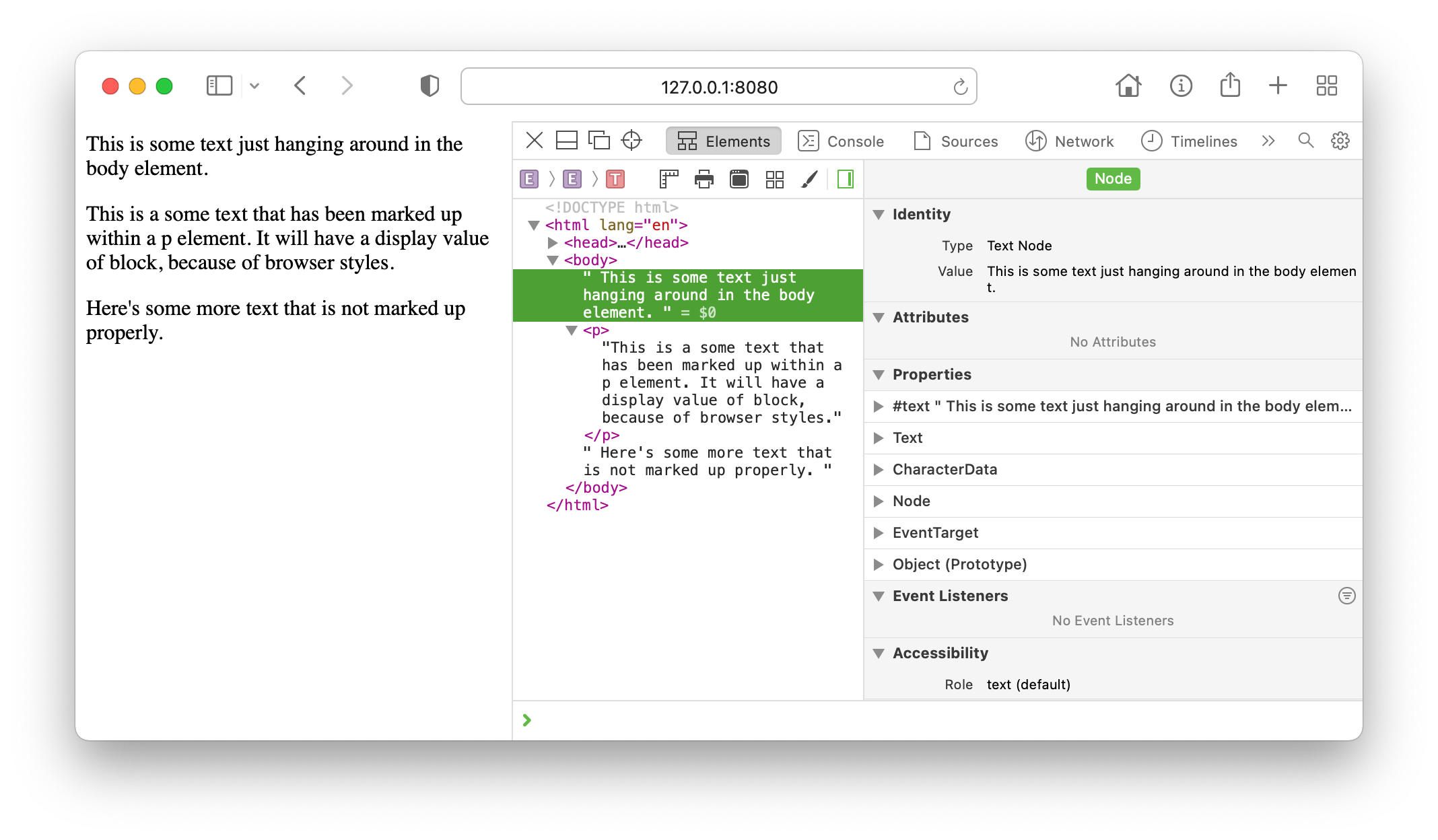
Each browser’s engineering teams would probably have their own way of implementing this logic but we don’t need to worry too much about it. The only noticeable difference would be how each browser’s Devtools describe anonymous boxes. Take this snippet of code as an example.
<body> This is some text just hanging around in the body element. <p> This is a some text that has been marked up within a p element. It will have a display value of block, because of browser styles. </p> Here's some more text that is not marked up properly.</body>The <body> element and the <p> element both have a display value of block. As such, the two lines of text before and after the <p> element, cannot just be inline elements. The browser will generate an anonymous block box around each of these two lines, to ensure the block formatting context established by the <body> element only has block-level boxes within it.
If we examine this snippet of code as it is rendered in a browser using Devtools, you will notice that all the Devtools functionality and panels are not applicable to the un-marked up text, since we can neither select nor style them.
A block container box can establish either a block formatting context, which contains only block-level boxes, or it can establish an inline formatting context, which contains only inline-level boxes.
<p> This is a some text that has been marked up within a p element. It will have a display value of block, <em>because of browser styles</em>. However, within this p element, an <strong>inline formatting context</strong> has been established.</p>How many inline boxes do you think are in the above code snippet? The answer is 5, of which 3 are anonymous inline boxes. The p element itself generates a block box that contains the 5 inline boxes.
The em element generated an inline box to contain the text “because of browser styles”, while the strong element generated an inline box to contain the text “inline formatting context”. The rest of the text are contained by anonymous inline boxes generated by the p element and do not have an associated inline-level element.
Flow layout
Flow is an inner display value. As the logic of block and inline formatting contexts are automatically resolved by the browser, we refer to them together as flow layout. This is essentially how content had always been laid out by browsers since CSS was introduced.
Welcome! Unfortunately, you don’t have access to this lesson. To get access, please purchase the course or enroll in Magical Dev School.
Unlock this lesson