Essential CSS
JavaScript Roadmap
Learn JavaScript
Mastering Web Typography
Practical Astro
Understanding Async JS
Unorthodox Tailwind
API Masterclass
Build and Deploy
The Beginner Freelancer
Real World Node
Profile Billing Logout
Essential CSS
Lesson Plan
  1. Introduction
    1. Welcome to Essential CSS
    2. Getting started with the course
    3. What are file formats?
    4. Web standards
    5. What is HTML?
    6. What is CSS?
    7. Devtools, your indispensable best friend
  2. CSS Key Concepts
    1. Some background about CSS
    2. CSS Syntax and Terminology
    3. Selectors
    4. Cascade and Specificity
    5. Origin and Importance
    6. Inheritance
    7. How browsers handle CSS
  3. Basic Mental Model
    1. Everything on the web is a box
    2. The box model
    3. How big is your box?
    4. The relationship between px and em
    5. The `box-sizing` property
    6. The `display` property
    7. Formatting contexts
    8. Block boxes
    9. Inline boxes
    10. What is inline-block?
  4. Flexbox and Grid
    1. The parent-child relationship
    2. Sizing in Flexbox
    3. Flex directions
    4. Basic grid concepts
    5. Setting up a grid
    6. Placing grid items
    7. Box alignment
  5. Building web layouts
    1. Arranging your boxes on the web
    2. Positioning schemes
    3. Floating boxes
  6. Typography
    1. Making your text look good
    2. What is a font?
    3. Typesetting with CSS

Everything on the web is a box

0m:55s

This is a mental model that might help you better understand how things are laid out on web pages. Everything that you see on a web page has a rectangular border around it, in some cases, we can visualise these borders with CSS, but in others, these rectangular boundaries are only evident to the browser.
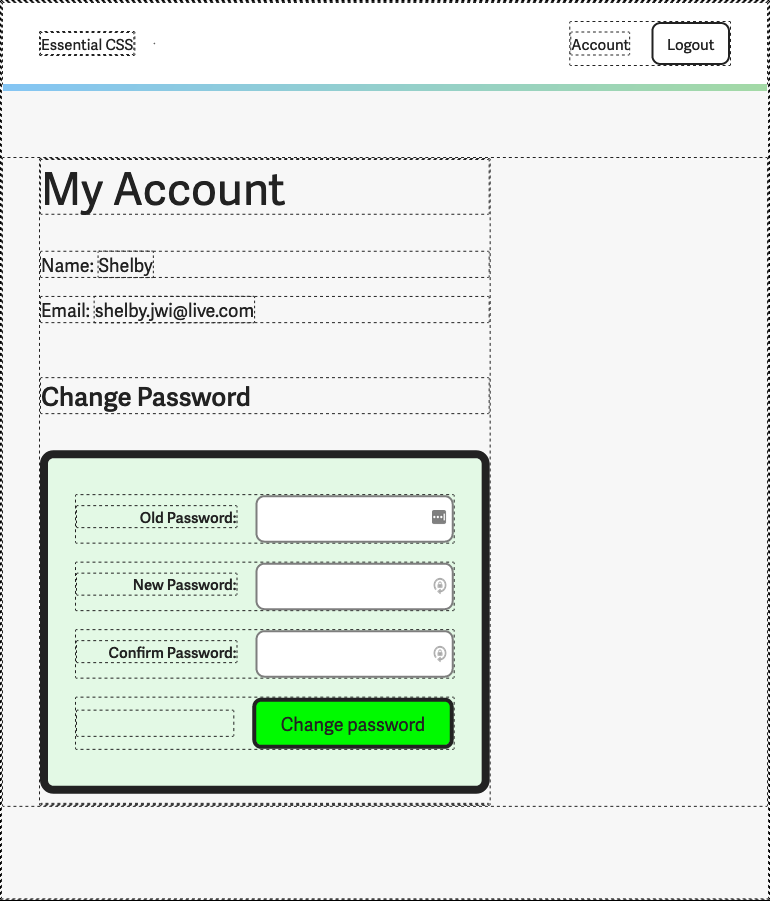
Screenshot of account page with dashed borders around every element

We can most likely attribute this to the nature of the ubiquitous screens around us these days. A vast majority of the screens we use today are raster displays, whose mechanics centre around a grid of discrete pixels.

The high-resolution screens of today are just better at packing more pixels into a smaller space, giving us the illusion of curves and irregular shapes, but really, when you zoom all the way in, its all boxes plotted on a grid.

There will be references to the example code used in the Getting started section, so it would be good if you had those files open in your code editor, and the index.html file loaded in your preferred browser.