Essential CSS
JavaScript Roadmap
Learn JavaScript
Mastering Web Typography
Practical Astro
Understanding Async JS
Unorthodox Tailwind
API Masterclass
Build and Deploy
The Beginner Freelancer
Real World Node
Profile Billing Logout
Unorthodox Tailwind
Lesson Plan
  1. Introduction
    1. Introduction
    2. What Tailwind brings to the table
    3. Tailwind: The Good and The Bad
    4. The First and Most Important Step
    5. Simple Unorthodox System
    6. The System I Use
  2. Tailwind Fundamentals
    1. Introduction
    2. Installing Tailwind
    3. Using Tailwind utilities
    4. Understanding Tailwind’s utility system
    5. Understanding Tailwind values
    6. Understanding Tailwind variants
  3. Unorthodox Fundamentals
    1. Introduction
    2. Making Simple Tailwind Utilities
    3. Components vs Utilities
    4. Specificity, Cascade, and CSS Layers
    5. Debugging Tailwind Styles
    6. Composable Utility System
    7. Create lots of components
  4. Layouts System
    1. Tailwind is great for layouts
    2. Four Types of Layouts
    3. Building Shell Layouts
    4. Building Macro Layouts
    5. Better Responsive Variants
    6. A collection of maximum widths
    7. A note on grid wrappers
    8. Working with sections
    9. Building Micro Layouts
    10. Positioning Layouts
  5. Typography System
    1. Introduction
    2. A system for using multiple typefaces
    3. Tailwind's font-size system
    4. Finding your font-size system
    5. My font-size system
    6. A simple responsive typography system
    7. The main body
    8. Vertical rhythm
  6. Theming System
    1. Introduction
    2. Tailwind's colour system
    3. The pigment system
    4. Tailwind's gradient system
    5. A friendlier gradient system
    6. Handling SVG fill and stroke
    7. Improving Tailwind's colour palette
    8. A simple way to theme
  7. Useful Tools
    1. Introduction
    2. Making functional utilities
    3. Custom variants
    4. Scaffolding tools
    5. Extending Tailwind
  8. Effects System
    1. Introduction
    2. Vertical text
    3. Strikethrough text
    4. Text stroke
    5. Highlighting text
    6. Nicer shadows
    7. Transitioning shadows
    8. Drop shadows
    9. Dark mode tricks
    10. Gradient borders
    11. More effects to explore
  9. Putting Everything Together
    1. The Unorthodox Tailwind process
    2. The 4 systems combined
    3. Create components liberally
    4. Advanced tips
    5. My CSS Structure
    6. A Cheatsheet
    7. Consolidating your thoughts
    8. Parting words

Create lots of components

1m:9s

There’s one final point I’d like to stress before we move on — and I cannot stress this enough.

Whenever you feel the urge to create a component, do it.

Using Tailwind doesn’t mean you can’t create CSS component files. For example, just look at the number of components I created for two of my websites!
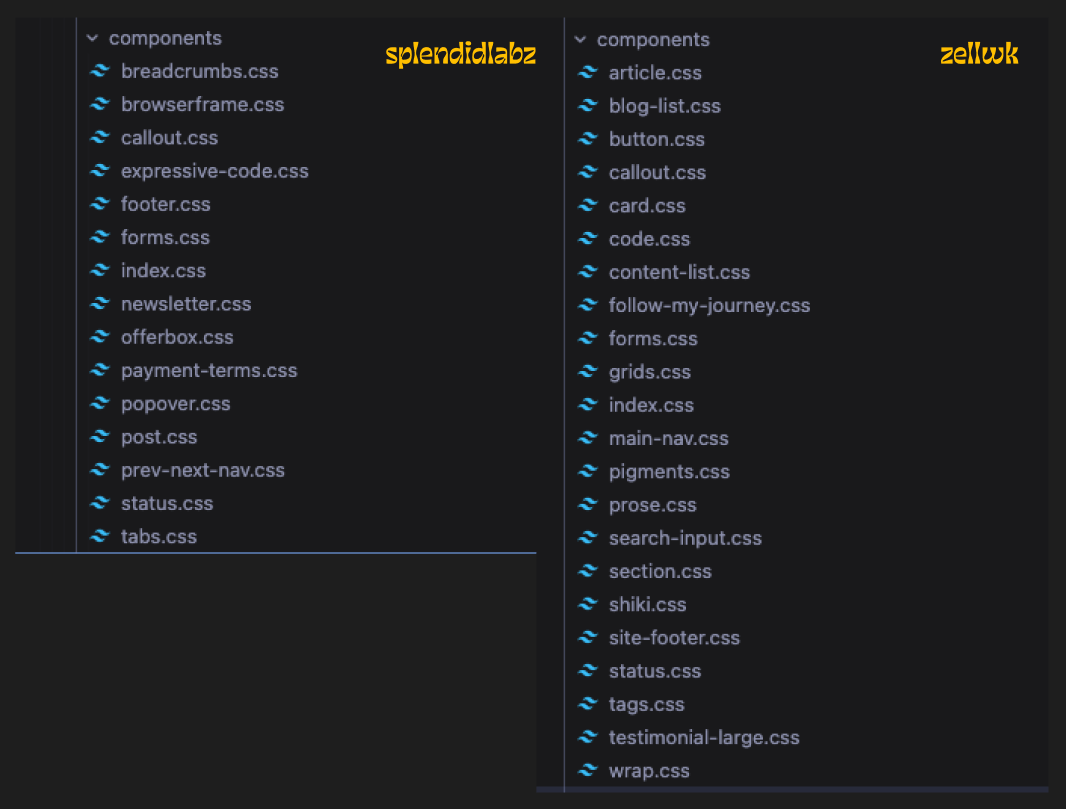
css components example

CSS Files > Framework Component Files

One of Tailwind’s official strategies for reusing styles is to extract them into component files. I find that advice to be a joke — because you can extract styles into CSS and make them even more reusable.

Imagine building a button component… you tell me which is more convenient:

Creating and using a button component

<-- Button.astro file -->
<button class="p-4 bg-blue-500">
<slot />
</button>
---
import Button from '../components/Button.astro'
---
<-- Using the button component -->
<Button> ... </Button>

Or simply just using CSS…

/* CSS file */
.button {
padding: 1rem;
background: var(--color-blue-500);
}
<a class="button"> ... </a> <button class="button">...</button>

I shall not say any more for now or I might not stop ranting… but we’ll cover this in more detail when we close up in the last chapter.

And now, without further ado, let’s dive into each of the categories to discover how to create utilities that facilitate your styling process!