The Rest architecture is one of the most confusing things for beginners because it contains 6 abstract-sounding principles:
- Client-Server
- Stateless
- Cacheable
- Uniform Interface
- Layered System
- Code on Demand
These principles sound abstract, but they make sense when you look at the way we build websites and applications today.
I’m going to give you an understanding of each of these principles so you don’t get overwhelmed when hearing other people talk about them.
You don’t have to remember any of these principles to use Rest APIs — just read through and know what they are.
Let’s begin!
Principle 1: Client-Server
Client-Server states that the clients and servers should be separate.
- Clients refer to user interfaces. In web development, it’s the frontend we show to users. (I use browser and clients interchangeably in this course).
- Servers refer to the backend. Clients connect to these to get data. One example is Github’s API server.
When clients and servers are separated, they can be worked on separately and thus be evolved separately.
The key is to have a uniform interface between clients and servers so they can talk to each other. This interface is the API.
Principle 2: Uniform Interface
Having a uniform interface means we have a set of consistent rules that can be used to communicate between clients and servers.
In REST, four rules were created for this purpose:
- Resource identification in requests
- Self-descriptive messages
- Manipulation of resources through these representations
- Hypermedia as the engine of application state (HATEOAS)
We’ll go into more detail on each of them.
Resource identification in requests
Anything transferred from a server to a client is considered to be a resource. For example:
- The HTML file is a resource
- The CSS file is a resource
- The JavaScript file is a resource
- Any data you fetched through XHR or Fetch is also a resource
This rule means: the request must identify what resource they’re trying to fetch. In practice, this is done with the URL we send in the request.
For example, the following URL fetches a list of my repositories on GitHub.
https://api.github.com/users/zellwk/reposSelf-descriptive messages
This rule means: Servers must tell the client how to process the data they’re sending. This allows the client to process the data and convert it into a usable form.
This message is sent via a MIME Type.
In simple words:
- If the server sends JSON, it must say it’s sending JSON.
- If the server sends XML, it must say it’s sending XML.
- And so on.
You don’t have to worry about the MIME type in practice (if you’re using libraries). Most libraries would have already handled it for you.
Resource manipulation through representations
A representation is the data that the server sends back. It can be in any format: JSON, XML, PDF, etc.
This rule means: The response from the server must tell the client how to manipulate the data.
Manipulation in this case means:
- It must tell a client how to update the data
- It must tell a client how to delete the data
In practice, servers often send over the id of a resource. The id can then be used in a request to manipulate the data.
Of course, the user must have the necessary permissions to manipulate the data before he or she can do so.
Hypermedia as the engine of application state (HATEOAS)
HATEOAS sounds complicated, but they’re not.
It means: Servers should send URLs to help clients discover other resource endpoints. Clients can then use these endpoints to get additional data.
For example, if you send a request to Github’s root endpoint, you get a list of URLs. This list of URLs tells you other resources you can fetch.
const response = await zlFetch('https://api.github.com')console.log(response.body)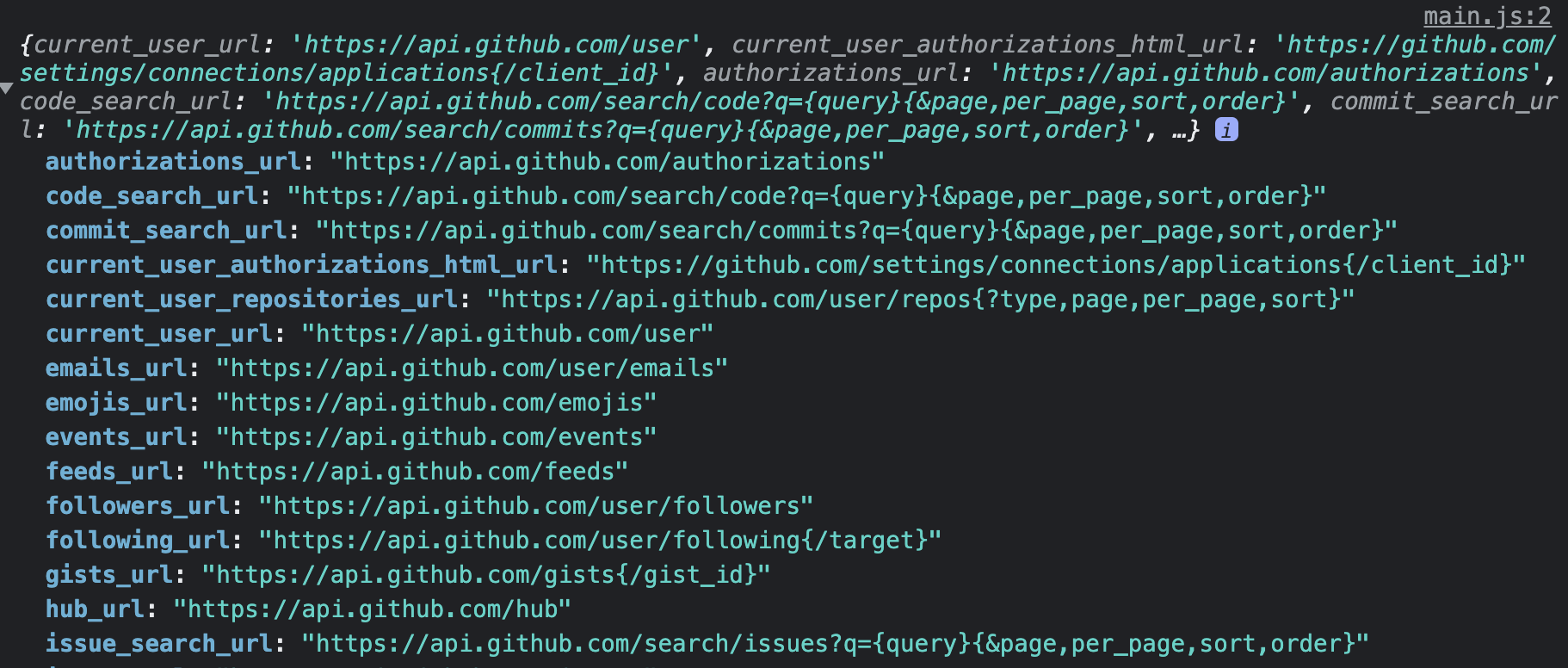
Principle 3: Stateless
Stateless means the server will not save information from a previous request. It will treat each request as a brand-new one.
In practice, this means you have to send all information required by the server in each request — including information to authenticate the user, even if you have authenticated before in a previous request.
This principle makes servers easier to code since it passes the responsibility of managing user state to the client.
Principle 4: Cacheable
Caching is a process where the client stores information upon receiving them. The client can use this stored information later. Information must be permitted by the server before it can be stored
Examples of caching include:
- Storing the HTML so the browser doesn’t have to ask for it again
- Storing the CSS so pages load quicker
- Storing the JavaScript so pages become interactive quicker
Caching speeds things up by reducing the amount of connections to the server. If a connection is required, it can still reduce the amount of work done by a server by reducing the amount of checks required.
The downside is cached resources can become outdated, so cacheable data often comes with an expiry date. Servers must tell clients how long to cache the data for and when the data expires.
Principle 5: Layered System
Layered system expands on the Client-Server concept.
The Client is a layer, the Server is another layer, and they know nothing about each other except for the APIs connecting the two.
The Layered System principle says you can add additional layers between clients and servers like:
- A cache layer (which allows caching)
- A load balancing layer (which divides how traffic hits the server)
There are other possible layers, but we won’t dive into them since they’re not the focus of this course.
Principle 6: Code on Demand
The Code on Demand principle says the server can send you executable code (often JavaScript). The client can then execute this code upon receiving it.
You’ve seen if you’ve been given a <script> to put on your website. Google Analytics is one example.
<!-- Google analytics script uses the Code on Demand principle --><script  async  src="https://www.googletagmanager.com/gtag/js?id=GOOGLE_ANALYTICS_ID"></script>
<script>  window.dataLayer = window.dataLayer || []  function gtag() {    dataLayer.push(arguments)  }  gtag('js', new Date())  gtag('config', 'GOOGLE_ANALYTICS_ID')</script>
Wrapping up
Don’t worry about remembering or knowing these principles by heart. You don’t have to — because most of these principles are already baked into the way we work.
I’m giving you an understanding of these principles so you don’t get overwhelmed when hearing other people talk about them.
Welcome! Unfortunately, you don’t have access to this lesson. To get access, please purchase the course or enroll in Magical Dev School.
Unlock this lesson