You need to keep API Keys and API Secrets protected.
If they’re leaked:
- You may incur huge fees
- Your database may become corrupted and unusable
Neither is fun.
Once, I incurred a $60,000 expense on my Amazon account because my friend leaked my API Key and Secret. Thankfully, Amazon decided to waive that off or I would have been in deep trouble.
How to protect API Keys and API Secrets
There’s an industry-standard way to protect API Keys and API Secrets.
It involves two steps:
- Write the API Key and API secret in a
.envfile - Gitignore the
.envfile
Let’s see how this is done.
Step 1: Using a .env file
First, you need to create a .env file and place it in your project’s root folder.
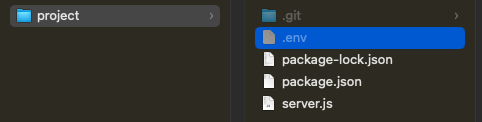
In this .env file, you can include any number of entries. Each entry should have the following syntax:
KEY_NAME="Your API Key"SECRET_NAME="Your API Secret"We normally write keys and secrets in UPPER_CASE to denote them as constants
(that will not be changed). This is a convention you can ignore if you wish
to.
Getting keys from the .env file
You can extract values from this .env file with a package called dotenv.
You can install dotenv with the following command:
npm install dotenv -SOnce you have installed dotenv, write the following line in your server.js file.
import 'dotenv/config'You can now use the variables you wrote in .env like this:
const YOUR_KEY = process.env.KEY_NAMEconst YOUR_SECRET = process.env.SECRET_NAME
console.log(YOUR_KEY)console.log(YOUR_SECRET)
Step 2: Gitignore the .env file
The second step is to gitignore the env file.
You can do this by creating a .gitignore file if it doesn’t exist already.
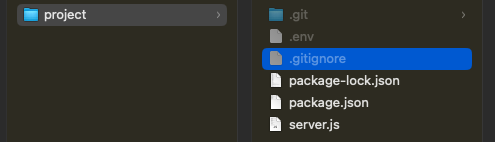
Then you insert .env into this gitignore file.
.envThat’s it!
Now we’re ready to move on to the next chapter, where you’ll learn everything you need to build a simple server with Express.
Welcome! Unfortunately, you don’t have access to this lesson. To get access, please purchase the course or enroll in Magical Dev School.
Unlock this lesson