Both Rest API and GraphQL is can be contained by a broader group known as HTTP APIs.
HTTP stands for HyperText Transfer Protocol. It determines how computers communicate with other computers over a network.
If you noticed the http or https part of a URL, you would have observed HTTP APIs in use.
Now, HTTP APIs have evolved over the years and many standards have been created.
For this course, you have to know that APIs have four major evolutionary points:
- 1991 — CORBA (Common Object Request Broker Architecture)
- 1999 — SOAP (Simple Object Access Protocol)
- 2003 — REST (Representational State Transfer)
- 2015 — GraphQL (Graph Query Language)
Today, REST and GraphQL are the two most popular structures. Nobody uses CORBA anymore, but enterprises may still use SOAP.
Common Object Request Broker Architecture — COBRA
CORBA was the first API.
It created a pattern where a client (a computer) needs to be able to communicate with a server (another computer).
This API says:
- The client must send a request to the server
- Then the client must wait for a response from the server
- Then the client can do what it wants with the response
Sounds familiar? Well, CORBA paved the way for how we fetch resources today.
There were two problems with CORBA:
- Nobody created a specification on how to send requests and receive responses so each CORBA request and response needs to be custom created between the user and the vendor. (This takes a lot of work).
- The CORBA spec had gaps which was covered by vendor companies. Iona (a company) had a monopoly share (around 80%) in the industry.
Lots of people decided to stop using Iona and that eventually led to the creation and adoption of SOAP.
Simple Object Access Protocol — SOAP
SOAP did not require bespoke systems to be created between each company. It used a common interface called XML (Extensible Markup Language).
XML looks very much like modern HTML except you can use anything for the tags. There are no standardised tags you need to follow.
<!-- XML Example --><Customer> <Order orderID="123"> … </Order> <Order orderID="456"> … </Order></Customer>The most important thing about SOAP is you can send a request to one endpoint to grab anything you want.
A SOAP request can look like this (I grabbed the image from this article)
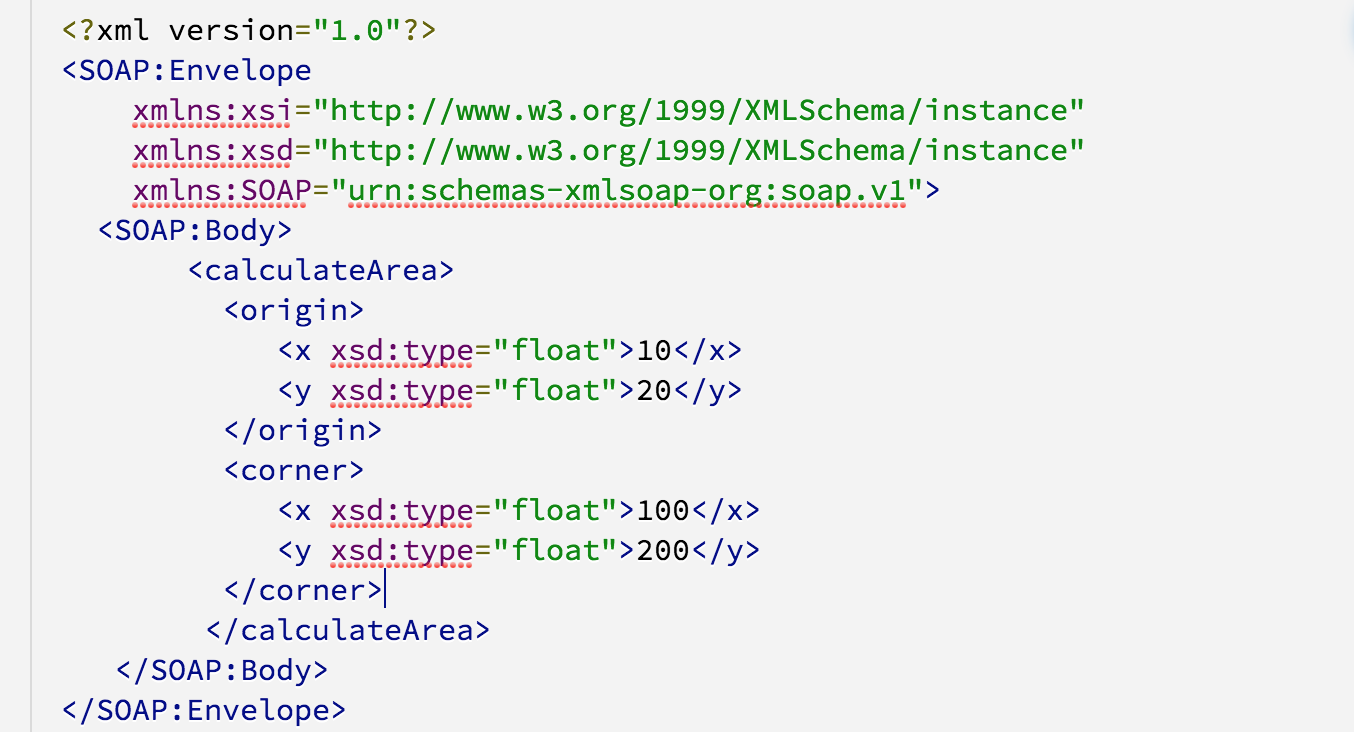
SOAP had a reputation for being hard to use and debug (mostly because it used XML). Apparently, parsing XML and getting error messages in XML is rather difficult.
And the next evolution is REST (which currently still the de-facto standard today).
Representational State Transfer — REST
There are several major noteworthy points about the REST architecture.
Here are the important ones to know for now. (I’ll talk about the rest as we go through the REST API chapter).
- There’s a creation of HTTP verbs like
GET,POST,PUT,PATCHandDELETE, which allows more standardisation of the types of requests. - REST allows a server to send information on how one should consume the data, so it made it easy for browsers to handle different data types like text, XML, images, PDF documents, JSON, etc.
In 2000, Roy Fielding filed a dissertation about REST. Around the same time, in 2001, Douglas Crockford discovered JSON and went on to popularise it.
The rise of REST is most probably brought about by a combination of the following events:
- Salesfore and Ebay released REST APIs for the general public to consume. which eventually increased the demand for APIs as well.
- Rails (which uses REST and JSON) got wildly popular and introduced many developers to the REST protocol.
But REST came with one problem: You may need to fetch many different resources to get every piece of information you need.
In contrast, you only had to send one request if you use SOAP.
This frustration eventually resulted in the creation of GraphQL.
Graph Query Language — GraphQL
GraphQL sits above a REST API, and it lets you define the structure of the data you wish to obtain.
The backend, after receiving the structure, will gather only the information you need, and send it back to you.
In this regard, GraphQL is very similar to SOAP.
The major difference is GraphQL defaults to JSON (but you can use XML) while SOAP requires you to use XML.
REST vs GraphQL
In the tech world, many people make the mistake of saying “X-techology is dead, Y-technology is the future”. People also say GraphQL is the future and you should use GraphQL over REST.
But if you’ve been following this very short history, you’ll know when to use REST and when to use GraphQL.
In simple terms:
- Use REST when your application is pretty simple and you can get everything from REST endpoints easily
- Use GraphQL if your application requires too many REST requests (you kinda need to run into REST problems to know what this means 😜).
But there’s a caveat: you can only use GraphQL if the API server supports GraphQL.
To date, most APIs support Rest and not GraphQL, so you may have a tough time finding GraphQL APIs.
Further Reading
If you’re the nerdy kind wants to read further, I found these resources extremely helpful in figuring out what I’ve just told you.
- Three-part article on the history of API design
- The History of REST APIs
- A brief history of JSON
- A Deep Look at JSON vs. XML: The History of Each Standard
- (Also: Wikipedia is always useful 😉).
Welcome! Unfortunately, you don’t have access to this lesson. To get access, please purchase the course or enroll in Magical Dev School.
Unlock this lesson