Now that we’re done talking about Markdown, content collections, and all the basic stuff people associate with static site content… it’s time to turn our attention to partials.
A partial is like a component that doesn’t have properties. So you can think of splitting a long page into multiple parts, and each part can live in one partial, which makes organization a lot easier.
This is one of the best things I’ve created for handling long pages.
---import { Partial } from '@splendidlabz/astro'---
<Partial path="first-section" /><Partial path="second-section" /><Partial path="third-section" /><Partial path="fourth-section" /><!-- and so on ... -->
This is not Astro’s page partials
Astro has a feature called page partials where you export a partial variable. They need to be used with a frontend library like htmx.
---// Declaring an Astro page partialexport const partial = true---
<!-- Content goes here -->
<!-- Using an Astro page partial --><button hx-post="/partials/clicked/" hx-trigger="click" hx-target="#parent-div" hx-swap="innerHTML"> ...</button>I don’t use Astro page partials because I don’t see a need to complicate things by including yet another library. I also don’t like the fact that it uses JavaScript to pull content when there is no real need for an async operation.
Components vs Partials
The way I am thinking about partials is very much similar to how one would think of components. There are two major differences between them.
First: partials cannot use client directives (because they’re not components).
Second: it is much easier to import a partial because we just have to import the Partial component and specify the path for each partial. Here’s an example of this difference:
---import ComponentOne from '@/components/ComponentOne.astro'import ComponentTwo from '@/components/ComponentTwo.astro'import ComponentThree from '@/components/ComponentThree.astro'---
<ComponentOne /><ComponentTwo /><ComponentThree />---import { Partial } from '@splendidlabz/astro'---
<Partial path="component-one" /><Partial path="component-two" /><Partial path="component-three" />Using Partials
To use the partials components that I have created, you need to put all your partials in src/content/partials/.
src/content/partials/└── partial-one.astro└── partial-two.astroNested partials are supported so you can do this too.
src/content/partials/└── practical-astro └── intro.astro └── second-section.astro └── third-section.astroTo use a partial, you provide a path to the partial, relative to the partials folder, excluding the extension.
<Partial path="practical-astro/intro" /><Partial path="practical-astro/second-section" /><Partial path="practical-astro/third-section" />Usage with md and mdx files
Partials support markdown files as well. But you need to add them to a content collection to use them.
export const partials = defineCollection({  loader: glob({    base: './src/content/partials',    pattern: '**/*.{md,mdx}',  }),})
export const collections = {  partials,  /* Other collections ... */}
Then use the partials like normal.
{/* Works even if intro is intro.mdx */}<Partial path="practical-astro/intro" />Naming patterns
I’ve realized it’s a very useful pattern to order file names with numbers, so I built that feature into Partial as well. This means you can name your files with 01.name.astro, 02.name.astro so you have an idea what the order is.
Here’s an example where I used this for Practical Astro’s course page.
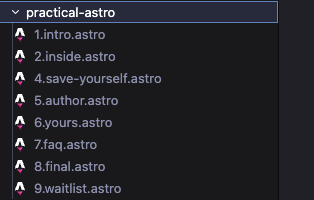
You can omit the numbering when retrieving the partials. This makes it a lot easier to keep things organized. Here’s a usage example for the same course page.
<Partial path="practical-astro/intro" /><Partial path="practical-astro/inside" /><Partial path="practical-astro/save-yourself" /><Partial path="practical-astro/author" /><Partial path="practical-astro/yours" /><Partial path="practical-astro/faq" /><Partial path="practical-astro/final" />Code snippet to copy-paste
Using a partial
---import { Partial } from '@splendidlabz/astro'---
<Partial path="basename" />
Linking to nested partials
---import { Partial } from '@splendidlabz/astro'---
<Partial path="folder/basename" />
Using MDX partials
For this you need to define a partials collection. Once you have this, use it as if you’re using a .astro partial.
export const partials = defineCollection({  loader: glob({    base: './src/content/partials',    pattern: '**/*.{md,mdx}',  }),})
export const collections = { partials, /* Other collections ... */}Welcome! Unfortunately, you don’t have access to this lesson. To get access, please purchase the course or enroll in Magical Dev School.
Unlock this lesson