Let’s start by copying all the code we have into a tabby.js file.
// Copy-paste all the code we wrote hereWe will then import tabby.js into main.js.
<script type="module" src="js/main.js"></script>import './tabby.js'Tabby should still work at this point, but we still have more work to do.
Resolving button inconsistencies
This is optional: But we can choose to move the part about button inconsistency back to main.js. We can do this because it’s not strictly a part of Tabby. It’s more of a global fix.
// Resolve browser inconsistencies when clicking on buttonsdocument.addEventListener('click', event => { if (event.target.matches('button')) { event.target.focus() }})Whether you move it is a personal choice though.
In my case, I chose to move the code back into main.js.
Creating multiple instances
Right now, our code supports only one instance of Tabby. We only support one instance because we used querySelector instead of querySelectorAll.
// This finds one `.tabby` only.const tabby = document.querySelector('.tabby')If we want to support multiple Tabby instances, we need to select multiple tabby instances with querySelectorAll.
const tabbies = [...document.querySelectorAll('.tabby')]
tabbies.forEach(tabby => {  const tabsList = tabby.querySelector('[role="tablist"]')  const tabs = [...tabby.querySelectorAll('[role="tab"]')]  const tabPanels = [...tabby.querySelectorAll('[role="tabpanel"]')]
  // All functions here  // All event listeners here})
If there are no Tabby instances present on the page, we don’t need to execute any code. We can check if Tabby instances exists with an if statement.
const tabbies = document.querySelectorAll('.tabby')
if (tabbies.length > 0) {  tabbies.forEach(tabby => {    // ...  })}
This code works, but it’s not very nice. There’s a huge chunk of code inside the forEach loop, which it can be hard to read.
We can make things easier by restructuring Tabby with OOP.
Restructuring with OOP
We’ll begin by commenting out the code we wrote. (We’ll add them back as we structure code with OOP).
You can choose any OOP flavour to work with. I’m going to show you how to use the Class syntax in this lesson.
First, we will create a Tabby class.
class Tabby { constructor() {}}We need to know which Tabby instance we’re using. We can ask users to pass the HTML element into the Tabby class.
tabbies.forEach(tabby => { new Tabby(tabby)})We can then find tabsList, tabs, and tabPanels from tabby.
class Tabby { constructor(tabby) { const tabsList = tabby.querySelector('[role="tablist"]') const tabs = [...tabby.querySelectorAll('[role="tab"]')] const tabPanels = [...tabby.querySelectorAll('[role="tabpanel"]')] }}We need to use tabby, tabsList, tabs, and tabPanels variables inside methods to switch tabs later, so we’ll save these variables as properties for easy access.
class Tabby { constructor(tabby) { this.tabby = tabby this.tabsList = tabby.querySelector('[role="tablist"]') this.tabs = [...tabby.querySelectorAll('[role="tab"]')] this.tabPanels = [...tabby.querySelectorAll('[role="tabpanel"]')] }}Let’s export Tabby for our users.
export default class Tabby { // ...}Our users can use Tabby like this:
import Tabby from `./tabby.js`
const tabbies = [...document.querySelectorAll('.tabby')]if (tabbies.length > 0) {  tabbies.forEach(tabby => {    new Tabby(tabby)  })}
Listening to events
We have three event listeners. Let’s add them one by one.
First, we have a click listener that selects the clicked tab.
tabsList.addEventListener('click', event => { const tab = event.target selectTab(tab)})We can put it inside the constructor function.
export default class Tabby {  constructor(tabby) {    // ...
    tabsList.addEventListener('click', event => {      const tab = event.target      selectTab(tab)    })  }}
We need selectTab before the event listener can work. Let’s bring selectTab into Tabby as a method.
export default class Tabby {  constructor(tabby) {    /* ... */  }
  selectTab(tab) {    const target = tab.dataset.target    const tabPanel = getTabpanel(target)
    // Selects a tab    tabs.forEach(t => {      t.removeAttribute('aria-selected')      t.setAttribute('tabindex', '-1')    })    tab.setAttribute('aria-selected', 'true')    tab.removeAttribute('tabindex')
    // Selects the corresponding tab content    tabPanels.forEach(c => c.setAttribute('hidden', 'true'))    tabPanel.removeAttribute('hidden')  }}
selectTab needs to the tabPanels variable to work. We can get this variable via this.tabPanels.
export default class Tabby {  constructor(tabby) {    /* ... */  }
  selectTab(tab) {    // ...    this.tabPanels.forEach(c => c.setAttribute('hidden', 'true'))    // ...  }}
Using the selectTab method:
export default class Tabby {  constructor(tabby) {    // ...
    tabsList.addEventListener('click', event => {      const tab = event.target      this.selectTab(tab)    })  }}
Clicking on a tab should select the tab and show the correct tabPanel now.
The second event listener
The second event listener selects the previous when the user presses left arrow key. It selects the next tab when the user press the right arrow key.
Here’s the code we wrote so far.
// Select previous or next tab when user press Left or Right arrow keystabsList.addEventListener('keydown', event => {  const { key } = event  if (key !== 'ArrowLeft' && key !== 'ArrowRight') return
  const index = tabs.findIndex(t => t.getAttribute('aria-selected') === 'true')
  let targetTab  if (key === 'ArrowLeft') targetTab = getPreviousTab(index)  if (key === 'ArrowRight') targetTab = getNextTab(index)
  if (targetTab) {    event.preventDefault()    targetTab.click()  }})
We can copy this event listener into Tabby’s constructor function as well.
export default class Tabby {  constructor(tabby) {    // ...    tabsList.addEventListener('keydown', event => {      const { key } = event      if (key !== 'ArrowLeft' && key !== 'ArrowRight') return
      const index = tabs.findIndex(        t => t.getAttribute('aria-selected') === 'true',      )
      let targetTab      if (key === 'ArrowLeft') targetTab = getPreviousTab(index)      if (key === 'ArrowRight') targetTab = getNextTab(index)
      if (targetTab) {        event.preventDefault()        targetTab.click()      }    })  }}
This event listener requires getPreviousTab and getNextTab to work. We can create these methods in Tabby.
export default class Tabby {  constructor(tabby) {    /* ... */  }
  getPreviousTab(index) {    if (index !== 0) {      return tabs[index - 1]    }  }
  getNextTab(index) {    if (index !== tabs.length - 1) {      return tabs[index + 1]    }  }}
Both getPreviousTab and getNextTab needs the tabs variable to work. We can access tabs via this since we saved a reference in the constructor function.
export default class Tabby {  constructor(tabby) {    /* ... */  }
  getPreviousTab(index) {    if (index !== 0) {      return this.tabs[index - 1]    }  }
  getNextTab(index) {    if (index !== tabs.length - 1) {      return this.tabs[index + 1]    }  }}
We can now use getPreviousTab and getNextTab like this:
export default class Tabby {  constructor(tabby) {    // ...
tabsList.addEventListener('keydown', event => { // ... if (key === 'ArrowLeft') targetTab = this.getPreviousTab(index) if (key === 'ArrowRight') targetTab = this.getNextTab(index) // ... }) }}Improving the code
The code for the second event listener looks overwhelmingly complicated. If we put so much code into constructor, it’s hard to figure out what’s actually happening when a Tabby instance gets initiated.
A nicer way is to create a method to hold the event listener’s callback. We can call this method handleLeftRight.
We can then call handleLeftRight from the event listener.
export default class Tabby {  constructor(tabby) {    // ...
    tabsList.addEventListener('keydown', event => {      this.handleLeftRight(event)    })  }
  handleLeftRight(event) {    // Code from the event listener  }}
This makes the code MUCH nicer. But we can still improve it.
One way to improve the code is to use bind. We can pass the this value via bind so this is still correct inside handleLeftRight.
export default class Tabby {  constructor(tabby) {    // ...
    tabsList.addEventListener('keydown', this.handleLeftRight.bind(this))  }
  handleLeftRight(event) {    // Code from the event listener  }}
But bind doesn’t have a friendly syntax. It makes the code complicated beyond what is necessary.
A better way is to create event handlers with arrow functions. (This only works with Classes or Constructor functions. Do not try to use it for Factory functions or OLOO!)
export default class Tabby {  constructor(tabby) {    // ...
    tabsList.addEventListener('keydown', this.handleLeftRight)  }
  handleLeftRight = event => {    // Code from the event listener  }}
Much nicer, isn’t it?
If you use Standard linter, you’ll notice it complains about a syntax error.
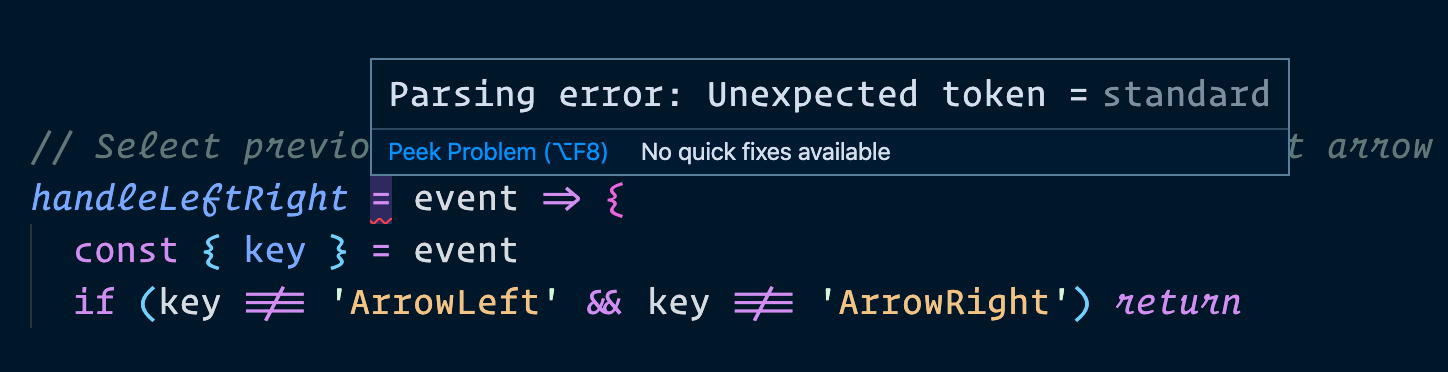
But this isn’t an error. It’s valid ES6 syntax. Unfortunately, Standard doesn’t recognise it. If you wish to use Classes this way, the best option is to change your linter from Standard into ESLint. (Standard actually uses ESLint underneath the hood, if that gives you some comfort).
Clearing up code for the first event listener
We can use the same arrow-function process for the first event listener. This makes the code much nicer.
export default class Tabby {  constructor (tabby) {    // ...
    this.tabsList.addEventListener('click', this.handleClick))  }
  handleClick = (event) => {    const tab = event.target    this.selectTab(tab)  }
  // ...}
The third event listener
We have a third event listener that shifts focus from the tab to the tab panel when a user presses ArrowDown or Tab.
// Shifts focus from tab to tabpaneltabsList.addEventListener('keydown', event => {  const key = event.key  if (event.shiftKey) return  if (key !== 'Tab' && key !== 'ArrowDown') return
  const tab = event.target  const target = tab.dataset.target  const tabPanel = getTabpanel(target)
  event.preventDefault()  tabPanel.focus()})
It’s relatively straightforward to make this work. You can use the same process we did with the two other event listeners above – so I’ll skip the steps and show you the completed code instead.
export default class Tabby {  constructor(tabby) {    // ...    this.tabsList.addEventListener('keydown', this.handleTab)  }
  getTabpanel(target) {    return this.tabby.querySelector('#' + id).parentElement  }
  handleTab = event => {    const key = event.key    if (event.shiftKey) return    if (key !== 'Tab' && key !== 'ArrowDown') return
    const tab = event.target    const target = tab.dataset.target    const tabPanel = this.getTabpanel(target)
    event.preventDefault()    tabPanel.focus()  }
  // Other methods}
A quick note on private variables
We mentioned it’s important to use private variables in the Object Oriented Programming section. But we aren’t using any private variables in this lesson. Why?
Yes, it’s true we can create private variables for tabby, tabsList, etc..
export default class Tabby {  // Creating private variable for tabsList  #tabsList
  constructor(tabby) {    // ...    this.#tabsList = tabby.querySelector('[role="tablist"]')
    this.#tabsList.addEventListener('click', this.handleClick)    // ...  }
  // ...}
But is there a merit in doing so? Are we afraid that users will abuse these variables and break the code?
In this case, we aren’t. So there’s no need to use private variables.
That’s it!
Welcome! Unfortunately, you don’t have access to this lesson. To get access, please purchase the course or enroll in Magical Dev School.
Unlock this lesson