We implemented an incomplete version of Optimistic UI for editing tasks so far. Our code let users edit their tasks without waiting for the server to respond.
To make Optimistic UI complete, we need to handle errors as well. If an error occurs, we want to revert the task back to its original state before the user changed it.
To revert the DOM back to the state before the user changed it, we need to keep a record of the id, name, and done values of the task.
Recording state
The best way to record state is to keep it in memory. This means we store a list of tasks inside a JavaScript object. Let’s call this object state.
const state = {}We’ll store the list of tasks in a property called tasks. And we’ll use state.tasks as a source of truth.
This means state.tasks should always be the actual values stored in the database. Meanwhile, the values in the DOM will be an illusion for our users.
The first thing to do is update state.tasks when we fetch tasks.
Updating state when fetching tasks
When we fetch tasks from the database, we set state.tasks to the response body (which is an array of tasks objects).
// Fetching taskszlFetch(`${rootendpoint}/tasks`, { auth }) .then(response => { // Update the state object state.tasks = response.body // ... }) .catch(error => console.error(error))Then, we’ll create our list of task elements from state.tasks.
zlFetch(`${rootendpoint}/tasks`, { auth }) .then(response => { // ... state.tasks.forEach(task => { const taskElement = makeTaskElement(task) taskList.appendChild(taskElement) }) // ... }) .catch(error => console.error(error))Next, we need to update state.tasks when we create tasks.
Updating state when creating tasks
state.tasks must always be the actual values from the database. This means update state.tasks only when we receive a successful response from the server.
// Adding a task to the DOMtodolist.addEventListener('submit', event => { // ... zlFetch .post(/* ... */) .then(response => { // Update state.tasks here }) .catch(/* ...*/) // ...})The new task will be the final item in the list. Since state.task is an array, we can use push to update it.
todolist.addEventListener('submit', event => { // ... zlFetch .post(/* ... */) .then(response => { // Updates the state const task = response.body state.tasks.push(task) }) .catch(/* ...*/) // ...})Then we remove the temporary task and add the actual task into the DOM.
todolist.addEventListener('submit', event => { // ... zlFetch .post(/* ... */) .then(response => { // ... taskList.removeChild(tempTaskElement) const taskElement = makeTaskElement(task) taskList.appendChild(taskElement) }) .catch(/* ...*/) // ...})At this point, the Todolist should still work. You’d want to check you got the code right by fetching and creating tasks before you continue to the next step.
Updating state when editing tasks
When we edit tasks, we want to update the correct task in two places:
- In the database.
- In
state.tasks
We update the task in the database by sending a PUT request. Since we want state.tasks to reflect the actual values from the database, we update state.tasks only when we get a successful response from the server.
// Editing taskstaskList.addEventListener( 'input', debounce(function (event) { // ... zlFetch .put(/*...*/) .then(response => { // Update the state here }) .catch(/* ... */) // ... }, 250),)This time, we need to know which task to update. We can get the task to update by using findIndex.
// Editing taskstaskList.addEventListener( 'input', debounce(function (event) { // ... zlFetch .put(/*...*/) .then(response => { // Update the state const index = state.tasks.findIndex(t => t.id === id) state.tasks[index] = response.body }) .catch(/* ... */) // ... }, 250),)Handling errors when editing tasks
We can create an error by not sending in the required credentials for the API.
taskList.addEventListener( 'input', debounce(function (event) { // ... zlFetch .put(`${rootendpoint}/tasks/${id}`, { // Deliberately missing auth to create an error response body: { name, done, }, }) .then(/* ... */) .catch(/* ... */) // ... }, 250),)When an error occurs, we need to find the value of the task before the user changed it. We can get this value from state.tasks. We can use find to get the original values.
taskList.addEventListener( 'input', debounce(function (event) { // ... zlFetch .put(/*...*/) .then(/* ... */) .catch(error => { const originalTask = state.tasks.find(t => t.id === id) }) // ... }, 250),)Then, we change the task’s input and checkbox values to the original values. Remember to sanitise values before placing them into the DOM.
taskList.addEventListener( 'input', debounce(function (event) { // ... zlFetch .put(/*...*/) .then(/* ... */) .catch(error => { // ... taskInput.value = DOMPurify.sanitize(originalTask.name) checkbox.checked = originalTask.done }) // ... }, 250),)We also want to create an error message to let users know what went wrong.
taskList.addEventListener(  'input',  debounce(function (event) {    // ...
    zlFetch(/*...*/)      .then(/* ... */)      .catch(error => {        // ...        let errorMessage = ''        const { message } = error.body        if (message === 'TypeError: Failed to fetch') {          errorMessage = 'Failed to reach server. Please try again later.'        } else if (message === 'Unauthorized') {          errorMessage =            'Invalid username or password. Please check your username or password.'        } else {          errorMessage = error.body.message        }
        const errorElement = makeErrorElement(errorMessage)        flashContainer.appendChild(errorElement)      })    // ...  }, 250),)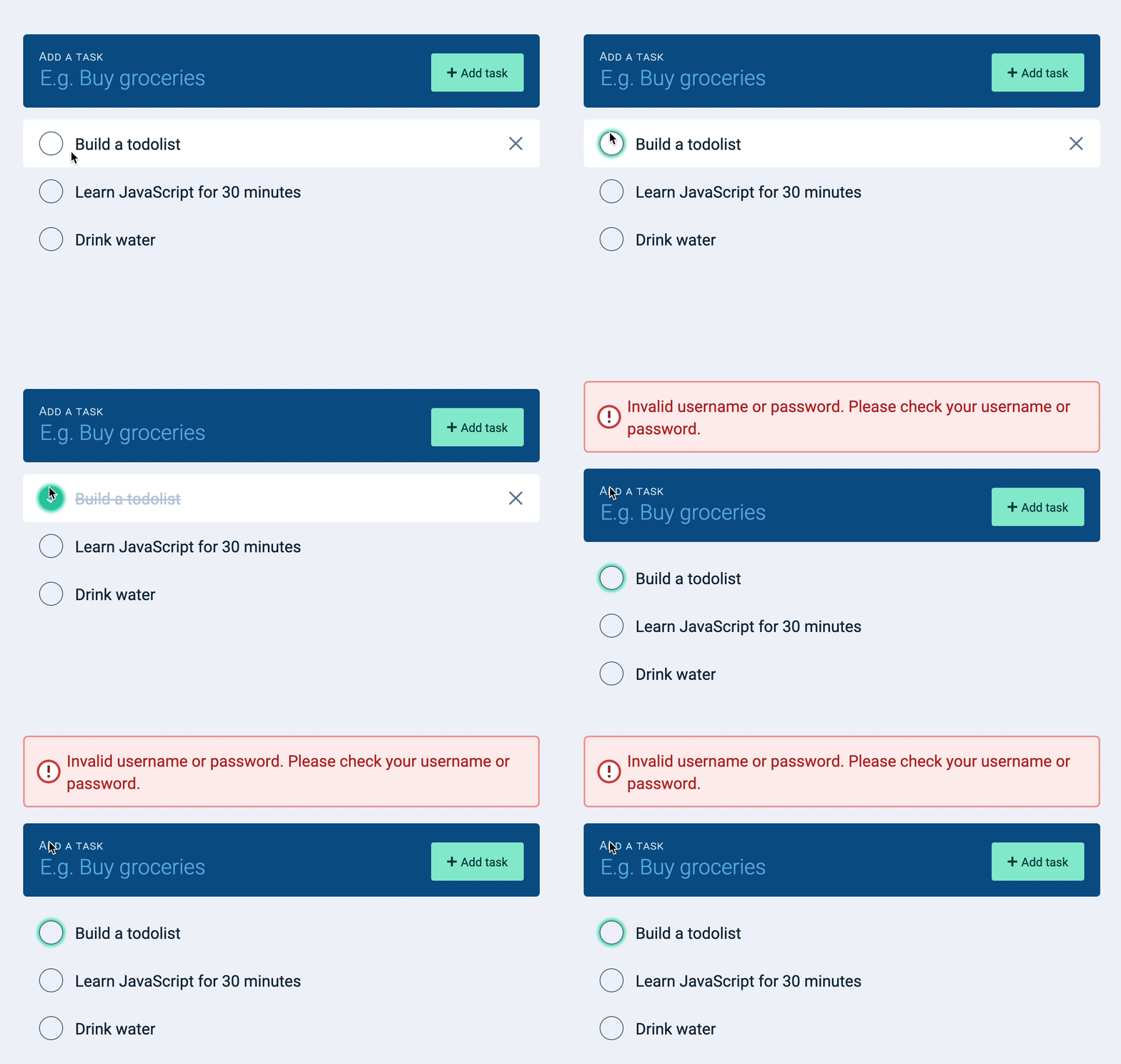
That’s it!
Welcome! Unfortunately, you don’t have access to this lesson. To get access, please purchase the course or enroll in Magical Dev School.
Unlock this lesson