You want to use appendChild or insertBefore as little as possible because it’s an expensive process to add elements to the DOM—everything after the element you added needs to be repainted by the browser.
const devs = ['Addy Osmani', 'Vitaly Friedman', 'Chris Coyier']
// Don't do this! It causes the DOM to update three timesconst ol = document.querySelector('ol')devs.forEach(dev => { const li = document.createElement('li') li.innerHTML = dev ol.appendChild(li)})There are two better ways to add multiple elements to the DOM.
- Replacing innerHTML
- Appending a document fragment
Replacing innerHTML
You can change multiple elements at once by changing the element’s innerHTML.
For example, let’s say you want to add three developers to an empty list.
<ol></ol>You can change <ol>’s innerHTML directly.
const ol = document.querySelector('ol')ol.innerHTML = ` <li>Addy Osmani</li> <li>Vitaly Friedman</li> <li>Chris Coyier</li>`And you’ll get this:
<ol> <li>Addy Osmani</li> <li>Vitaly Friedman</li> <li>Chris Coyier</li></ol>Manipulating arrays into a HTML string
In reality, you’ll probably have an array that contains devs you wanted to add to the DOM.
const devs = ['Addy Osmani', 'Vitaly Friedman', 'Chris Coyier']To create the HTML string, you can use map and join. Let’s talk about join since you haven’t learned it yet.
join combines every item in an array into a string. If you call join without any arguments, your items will be joined by a comma.
const string = devs.join()console.log(string) // AddyOsmani,Vitaly Friedman,Chris CoyierIf you want to join items without a separator, you can use an empty string.
const string = devs.join('')console.log(string) // Addy OsmaniVitaly FriedmanChris CoyierTo produce the HTML string, you want to use map to modify each array item into a list. Then, use join to convert the array into a string.
const string = devs.map(dev => `<li>${dev}</li>`).join('')
console.log(string)// <li>Addy Osmani</li><li>Vitaly Friedman</li><li>Chris Coyier</li>Once you have the final HTML String, you can change the innerHTML.
ol.innerHTML = stringWhat if you have existing items in the list?
Let’s say you have three developers in your list and you want to add three more developers to it.
<ol> <li>Rachel Andrew</li> <li>Jen Simmons</li> <li>Una Kravets</li></ol>// Devs to add to <ol>const devs = ['Addy Osmani', 'Vitaly Friedman', 'Chris Coyier']You can add the string to the original ol.innerHTML.
const string = devs.map(dev => `<li>${dev}</li>`).join('')ol.innerHTML = ol.innerHTML + stringThe downside of this approach? You replace the entire list. The GIF below proves that the first three items are also replaced even though they’re not changed.
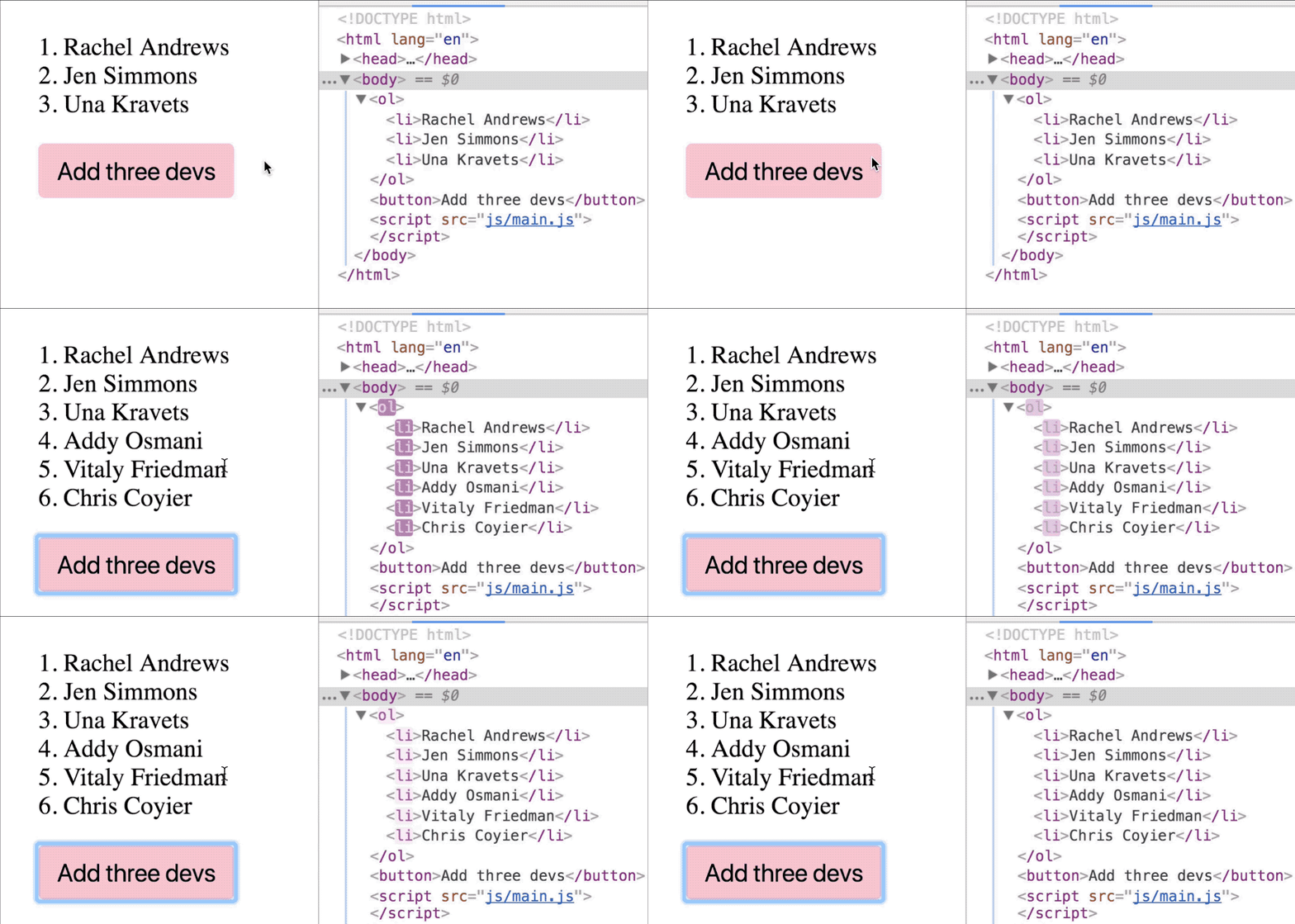
A better approach to add multiple items is through a document fragment.
Using a document fragment
A document fragment is like a separate DOM that lives only in JavaScript. It functions exactly like the DOM.
To create a document fragment, you use createDocumentFragment.
const fragment = document.createDocumentFragment()Document fragments can be treated like the DOM. That means you can add elements to the fragment with appendChild and insertBefore. Any changes you make to the fragment will not be reflected in the DOM (and hence not expensive) until you add the fragment into the DOM.
// DOM doesn't change with this codedevs.forEach(dev => { const li = document.createElement('li') li.innerHTML = dev fragment.appendChild(li)})You can add the fragment to the DOM with appendChild or insertBefore when you’re ready.
ol.appendChild(fragment)In this case, you can see from the GIF that the first three elements remain. You only added three more items into the list.
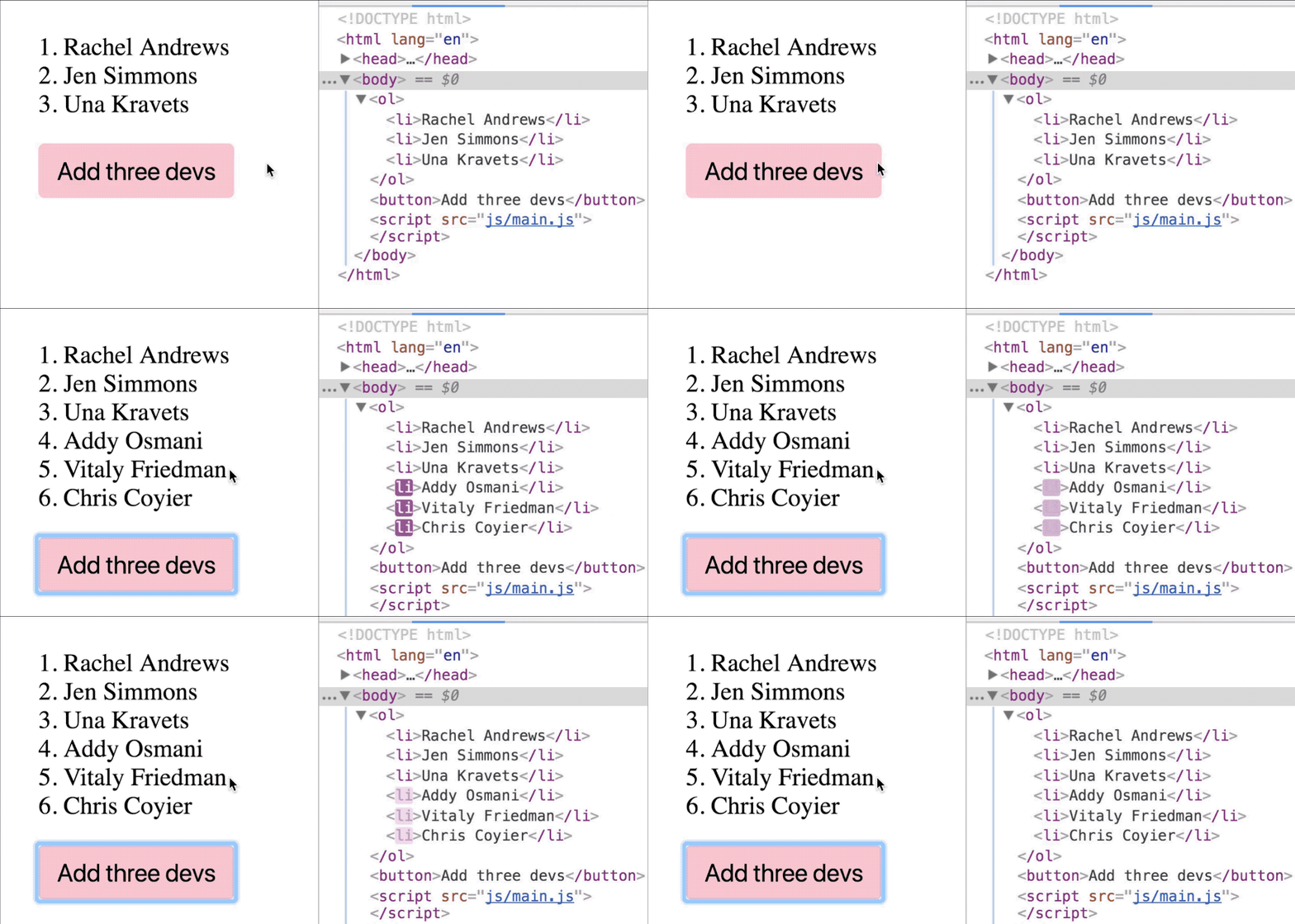
Exercise
Say you have the following HTML:
<div class="characters"> <ul class="elves"> <li>Legolas</li> <li>Arwen Evenstar</li> </ul></div>Do these with both methods you learned:
- Add a list of humans to
.characters. This list should have ahumansclass and contains five list items—Gandalf, Saruman, Aragorn, Boromir, and Faramir. - Add two list items—Glorfindel and Elrond—before Arwen Evenstar. Use the document fragment method.
Add a list of humans to .characters. This list should have a humans class and contains five list items—Gandalf, Saruman, Aragon, Boromir, and Faramir.
// Method 1: Replacing innerHTMLconst characters = document.querySelector('.characters')const humans = document.createElement('ul')humansDiv.classList.add('humans')humans.innerHTML = ` <li>Gandalf</li> <li>Saruman</li> <li>Aragon</li> <li>Boromir</li> <li>Faramir</li>`
characters.appendChild(humans)// Method 2: Appending a document fragmentconst humansToAdd = ['Gandalf', 'Saruman', 'Aragon', 'Boromir', 'Faramir']const characters = document.querySelector('.characters')
const humansDiv = document.createElement('ul')humansDiv.classList.add('humans')const frag = document.createDocumentFragment()
for (const human of humansToAdd) { const li = document.createElement('li') li.textContent = human frag.appendChild(li)}
humansDiv.appendChild(frag)characters.appendChild(humansDiv)characters.appendChild(humans)Add two list items—Glorifendel and Elrond—before Arwen Evenstart. Use the document fragment method.
const elvesToAdd = ['Glorifendel', 'Elrond']const elvesDiv = document.querySelector('.elves')
const frag = document.createDocumentFragment()
for (const elf of elvesToAdd) { const li = document.createElement('li') li.textContent = elf frag.appendChild(li)}
elvesDiv.insertBefore(frag, elvesDiv.children[1])Welcome! Unfortunately, you don’t have access to this lesson. To get access, please purchase the course or enroll in Magical Dev School.
Unlock this lesson