The cascade is one of the fundamental design principles of CSS. There’s a big reason why CSS is called “Cascading Stylesheets”. But what does cascade actually mean?
CSS allows multiple style sheets to affect the presentation of the elements in your document. This results in numerous instances where different declarations are trying to set a value for the same property on a specific element. Such conflicts need to be resolved in a predictable manner.
All browsers follow the same algorithm (i.e. set of rules) to combine and resolve property values from all these different style sheets. By understanding how the cascade works, you will be able to troubleshoot styling issues more easily. In the simplest terms, order matters when it comes to CSS rules. Given the two rules with equal specificity, the rule that comes last is the one that gets used.
In the earlier chapter on HTML, we mentioned that the class and id attributes of a HTML element can be used as selectors. The element itself can also be a selector. This means that there could be multiple rules with different selectors that apply to the same element. Here is where the concept of CSS specificity comes into play.
Specificity
If you are familiar with the concept of number bases, then you will know that the numeral system we use on a day-to-day basis is a base-10 number system. CSS specificity is not really a numeral system per se, but you can think of it as a base-infinity number system.
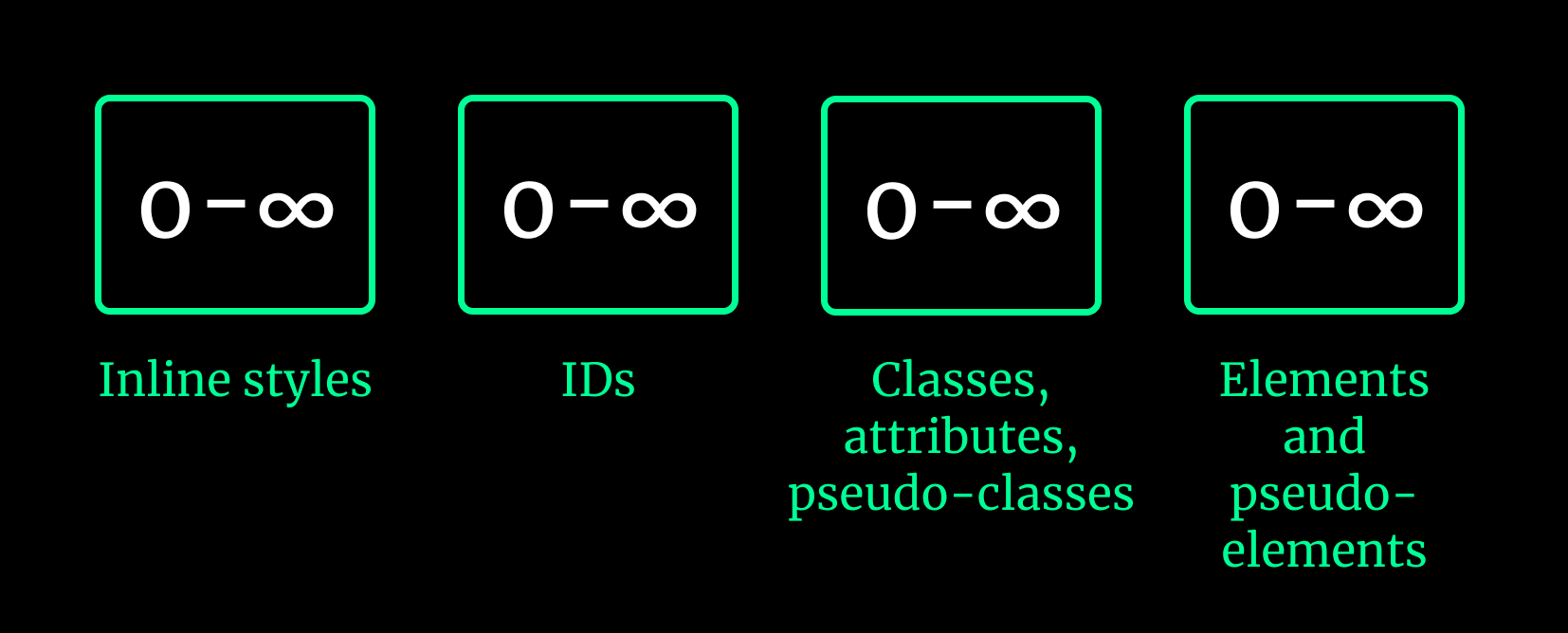
The selectors in the above diagram are, from left to right, in descending order of “strength”. In other words, even if you have a thousand element selectors, one class selector will trump it. And same goes for each category of selector as you move left.
This might be easier if you try to figure out the specificity of the selectors in the following three examples:

For the first example, we have one element selector, ul, so if we take the specificity values as a four digit system (like in the diagram above), it would have a specificity of 0, 0, 0, 1.
For the second example, we have two class selectors and one element selector, ending up with a specificity of 0, 0, 2, 1.
Finally, in the third example, we have one id selector, one class selector and one element selector, giving you a specificity of 0, 1, 1, 1.
We can conclude that the specificity of the third example’s selectors is the highest of the three. Specificity strength will trump position, i.e. even if you have a weaker selector that comes last, that rule will not apply.
<ul class="ingredients">  <li>4 large eggs</li>  <li>1/4 cup milk</li>  <li>2 tsp. butter</li></ul>
<ol class="instructions">  <li>BEAT eggs, milk, salt and pepper in medium bowl until blended.</li>  <li>    HEAT butter in large non-stick skillet over medium heat until hot. POUR IN    egg mixture. As eggs begin to set, GENTLY PULL the eggs across the pan with    a spatula, forming large soft curds.  </li>  <li>    CONTINUE cooking – pulling, lifting and folding eggs – until thickened and    no visible liquid egg remains. Do not stir constantly. REMOVE from heat.    SERVE immediately.  </li></ol>
.ingredients li { color: green;}
li { color: purple;}The result of the above CSS will render the ingredients list green, and not purple, because the specificity of the first style rule is higher than the second, and hence “wins”. But keep in mind that getting into “specificity battles” is usually not a good idea because it makes your code hard to maintain.
Specificity and order of appearance are only part of the cascade though.
Welcome! Unfortunately, you don’t have access to this lesson. To get access, please purchase the course or enroll in Magical Dev School.
Unlock this lesson